New · AI agents that answer in the caller's language, with translated transcripts. See how → · Read the docs → Talk to a human: (212) 555-0123

Total solution

Cadence Talk

Your phones, video meetings and team chat, together in one place, with AI that answers your calls, sits in on your meetings, writes the notes and tells everyone what was decided. Nothing to install, nothing to plug in.

app.cadencetalk.com
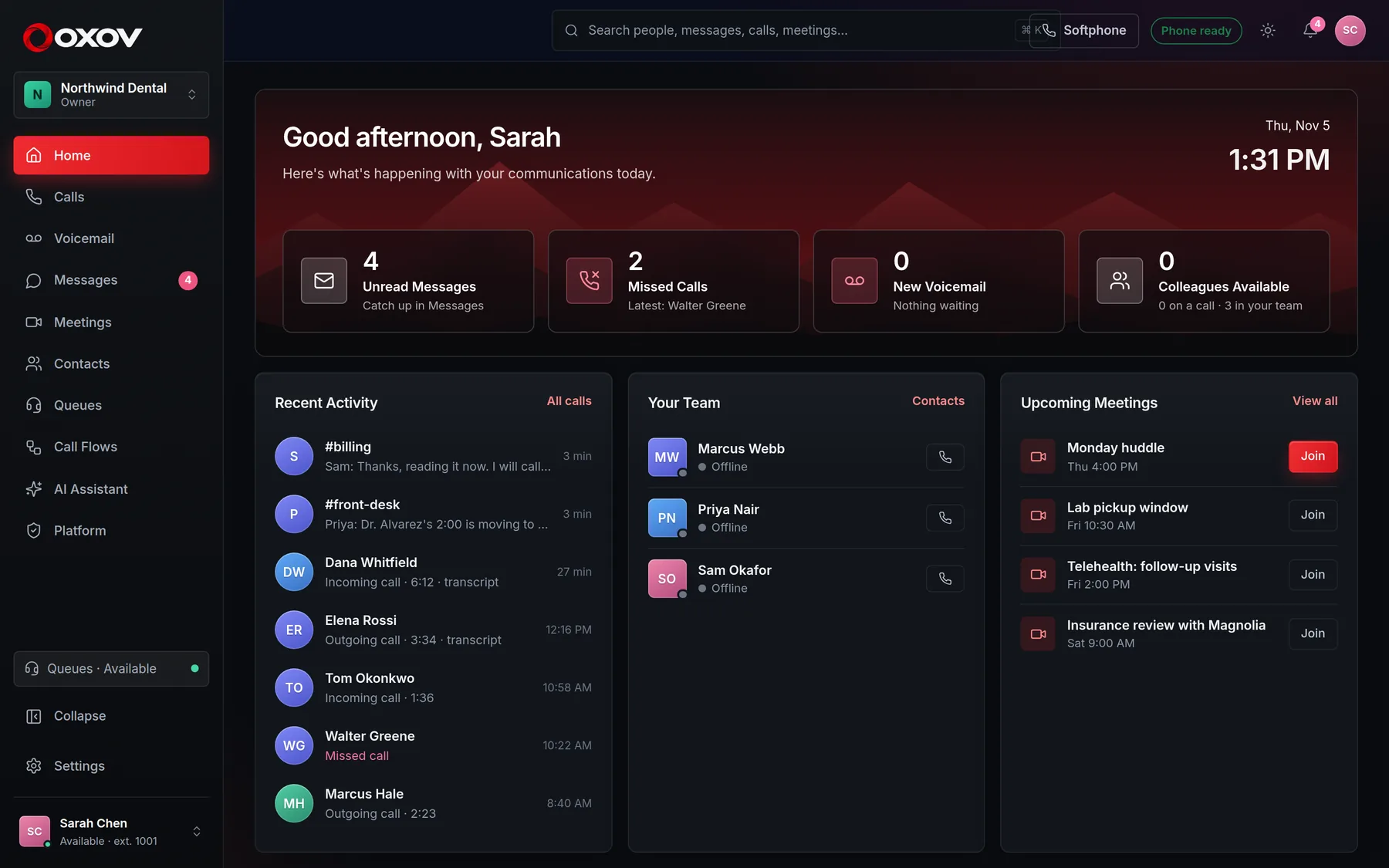
The Cadence Talk home screen: recent calls, your team, and upcoming meetings

See it in action

See it all.
Everything Cadence Talk does.

Cadence Talk: the full tour

Simple communications

What we do

Cadence Talk replaces the tangle of a phone provider, a video app and a chat tool with one system your whole team signs in to. Calls ring in the browser, meetings are one click, and every conversation is kept where you can find it.

Phone systemsVideo meetingsMessagingAI voice agentsCall listsAI meeting notesAI assistantSoftphone

Phone systems

A real business phone system, with no desk phones

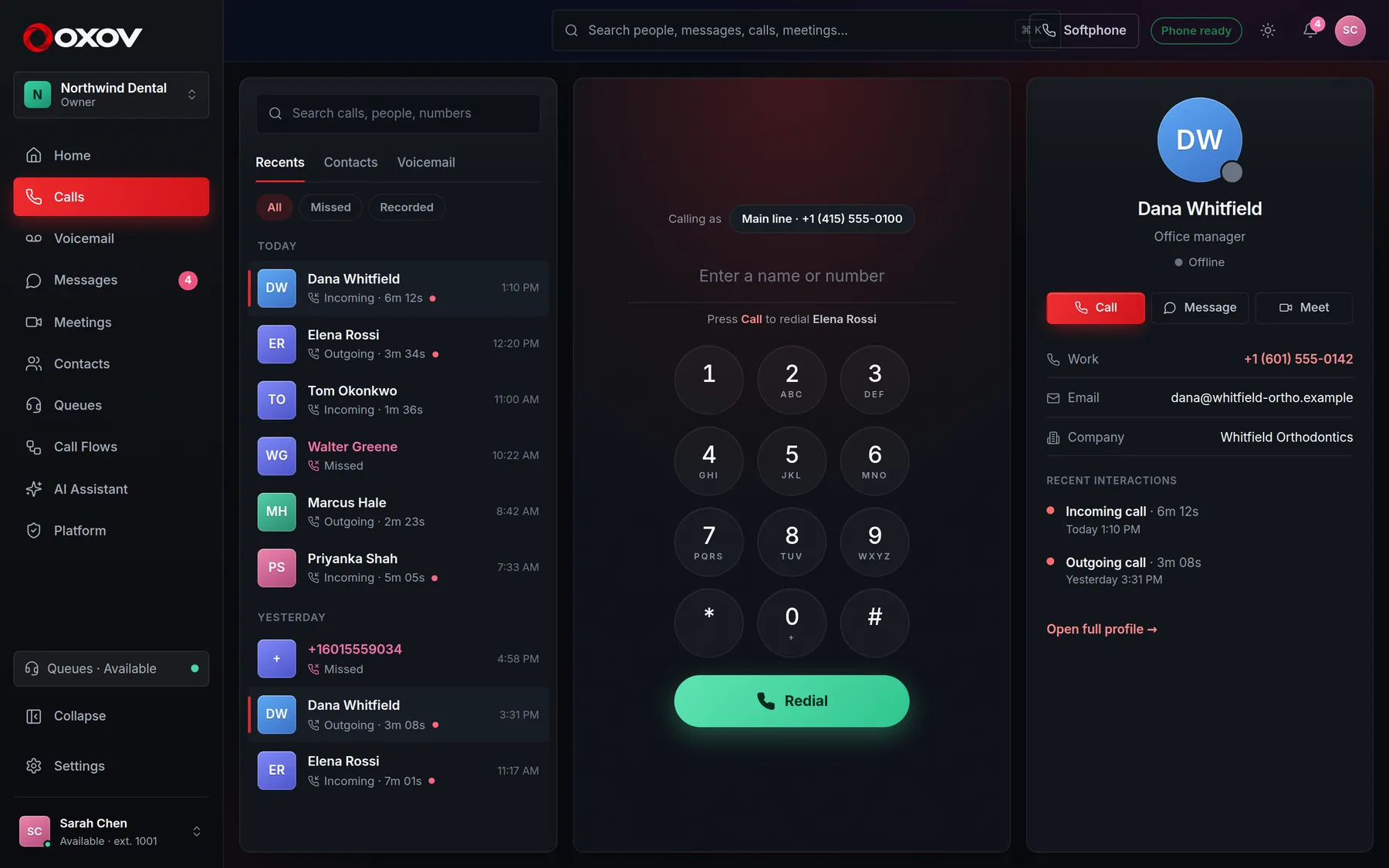
Give every person an extension and a softphone that lives in the browser. Answer, transfer, hold, merge and park from one screen, with your business number ringing right where you work.

  • Calls ring in the browser, with HD audio
  • Blind and attended transfer, three-way calls, park and pick-up
  • Voicemail next to your call history
Calls
The Cadence Talk softphone with recent calls and a contact card

Video meetings · now with the Cadence AI assistant

Meetings that take their own notes

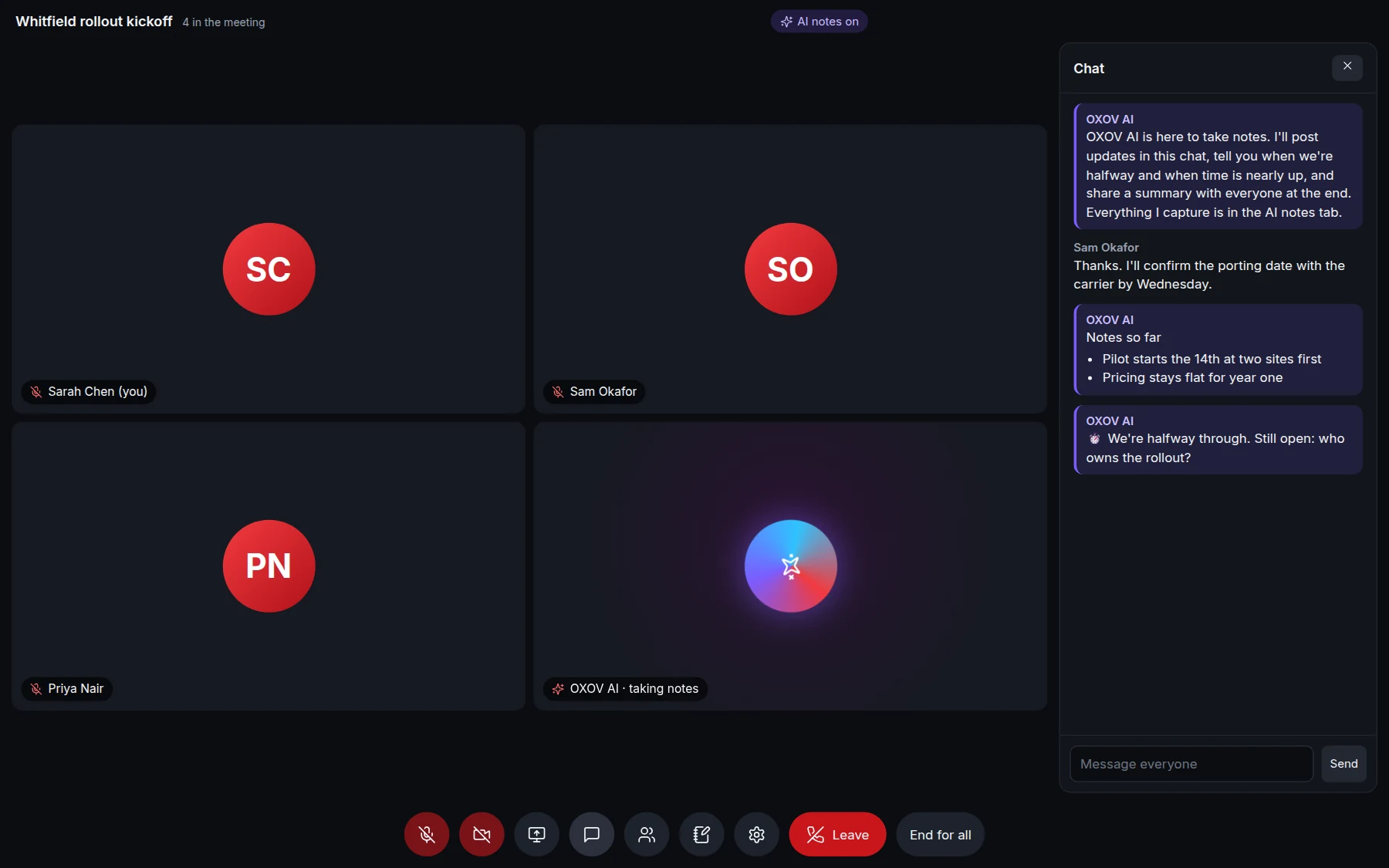
Start one in a click, schedule it with invitations, or share your own room. Guests join with a link and a PIN, anyone can dial in by phone, and the Cadence AI assistant can sit in: it listens, posts notes in the chat as you go, watches the clock, and sends everyone a summary when you finish.

app.cadencetalk.com · Meeting
A video meeting with the Cadence AI assistant in the room, posting notes and a halfway reminder in the chat

Add it in a click

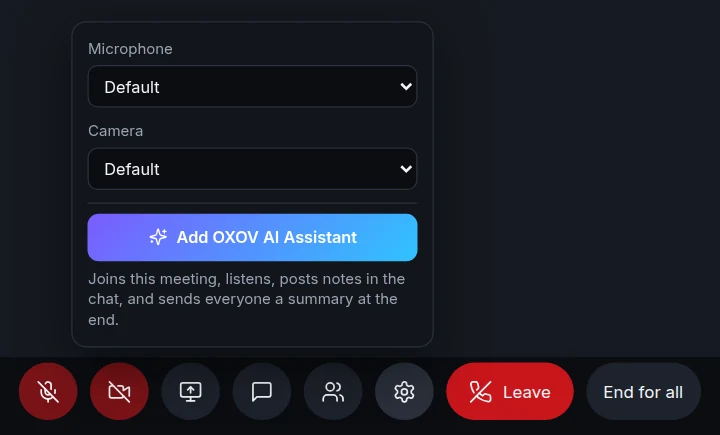
Invite the assistant mid-meeting, or schedule it in

Open the settings menu in any meeting and choose Add Cadence AI Assistant. Or tick one box when you schedule the meeting, and it joins the moment the meeting starts.

  • It joins as a visible participant called Cadence AI
  • Everyone sees an "AI notes on" badge
  • Admins can switch it off for the whole company

While you talk

Notes in the chat, and an eye on the clock

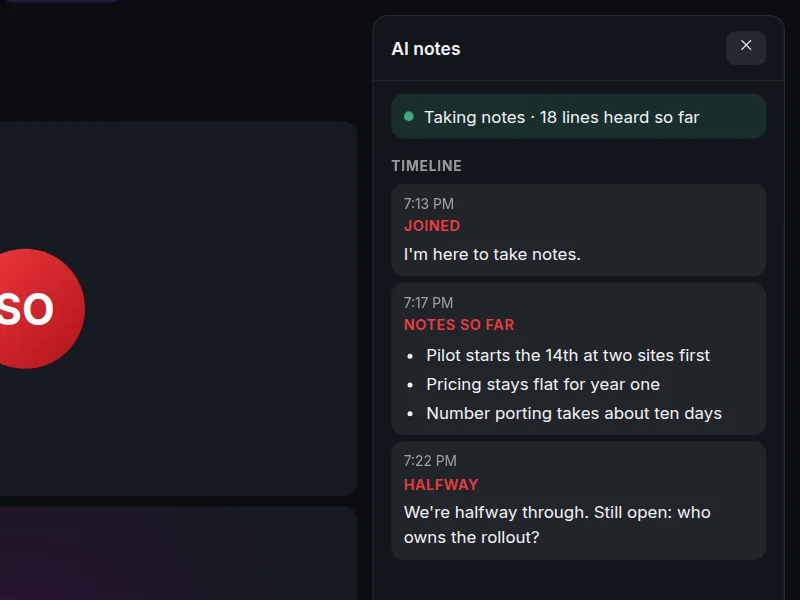
Short updates land in the meeting chat as the conversation moves, so latecomers can catch up at a glance. The assistant tells the room when you're halfway, when five minutes are left, and when time is up. Everything it captures is in the AI notes tab.

  • Live notes anyone in the meeting can read
  • Halfway, five-minutes-left and time's-up reminders
  • A timeline of everything it noted
AI notes
The AI notes tab in a meeting, with the assistant in the room and a timeline of what it noted

When it ends

A summary for everyone, action items included

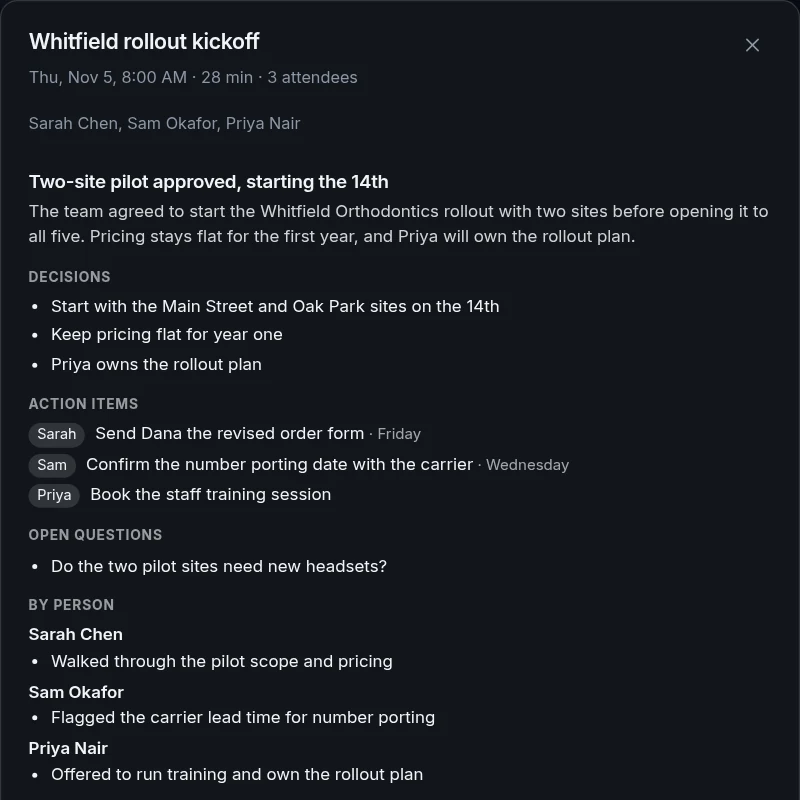
Decisions, action items with owners, open questions and what each person contributed go into the chat and are emailed to the colleagues who attended. Every meeting is kept under Past meetings, searchable by anyone who was there.

  • Decisions and action items, with owners and dates
  • Emailed to attendees, saved for later
  • Find it again by searching what was said
A meeting summary with decisions, action items with owners, open questions and what each person contributed
☑

Guests with a PIN

Outside guests join with a link and the meeting PIN, no account needed.

☎

Dial in by phone

Anyone can join from an ordinary phone with the same PIN.

▣

Share your screen

Screen sharing, chat and a live people list in every meeting.

◉

Host controls

Mute or remove people, or end the meeting for everyone.

The assistant writes its notes from what is actually said in your meeting. Telling attendees about notes and recording is up to you and the law where you operate.

Messaging

Team chat that sits next to the phones

Channels, direct messages and threads, with file sharing, search and mentions. Start a video call from any conversation and the link lands right in the thread.

  • Public and private channels
  • Attachments, reactions, GIFs and message search
  • Email alerts for what you missed
Messages
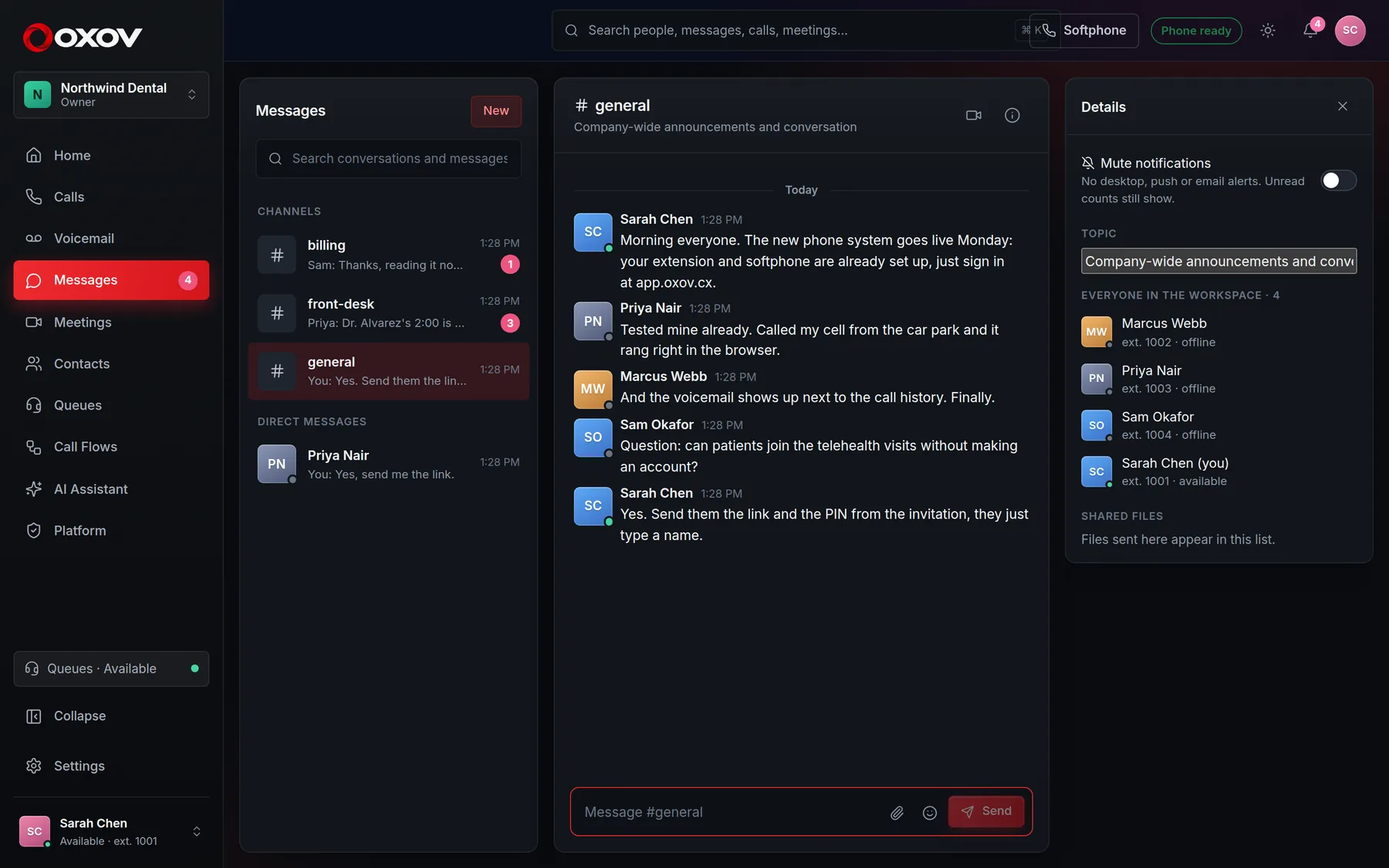
The Cadence Talk team chat with channels and a conversation

New · AI voice agents

An agent that answers your calls

Build a voice agent in minutes, give it your knowledge and your tools, and put it on your main line, after hours, or behind a menu. It listens and speaks in real time, so callers get an answer in a fraction of a second, not a robot menu.

Talks like a person

Natural, fast, and easy to interrupt

Agents use a speech-to-speech model, so there is no awkward wait between what the caller says and what they hear. Pick one of ten natural voices, set the pace, and let callers talk over it, just like a real conversation.

  • First word back in a fraction of a second
  • Replies in the caller's language
  • Always tells callers it is an AI, unless you say otherwise

Know-how and tools

Give it your knowledge, and connect your systems

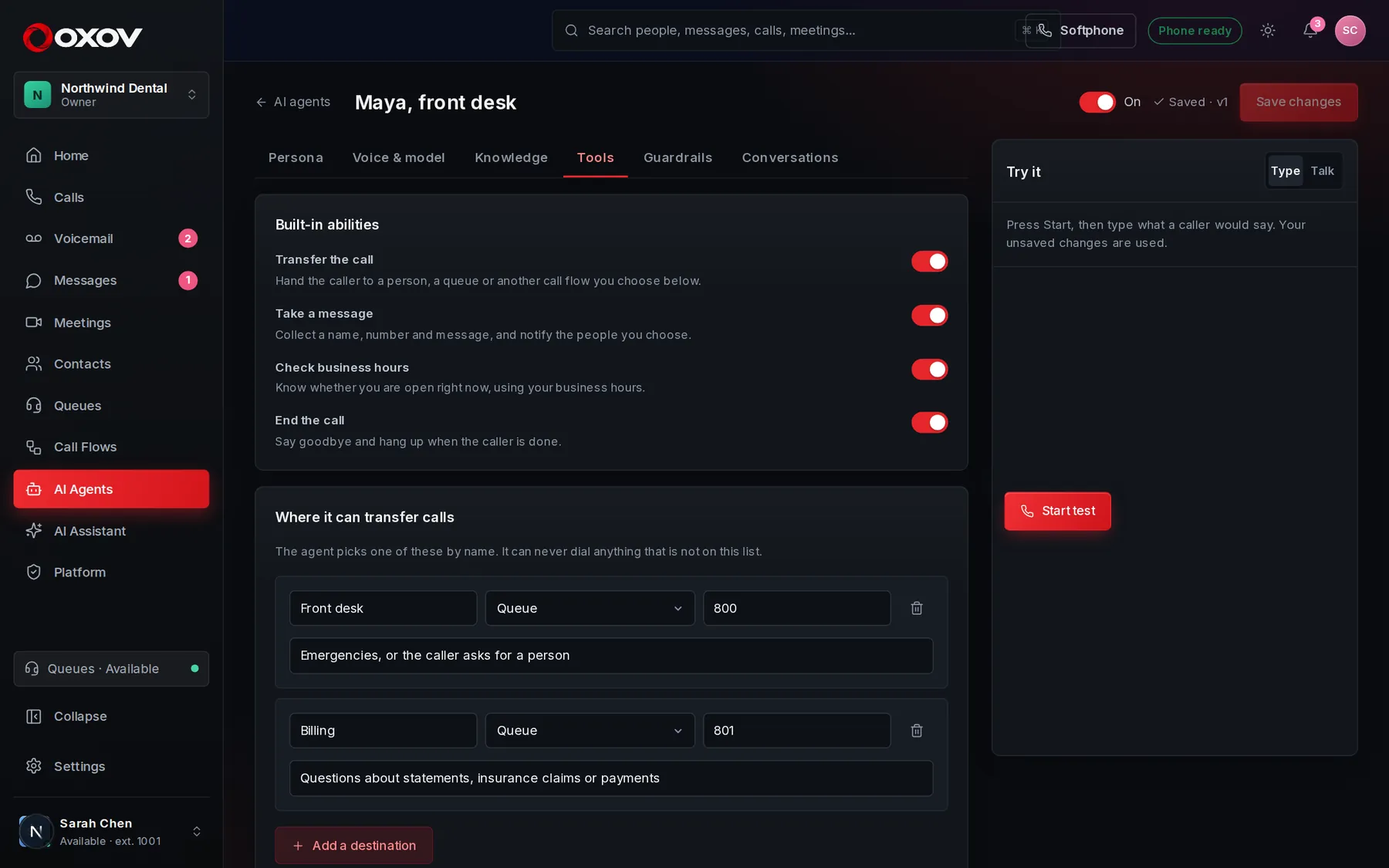
Paste in your hours, prices and policies. Connect web requests so it can look up an order or book a visit in your own software. It can transfer to a person or queue you choose, take a message, and it can never go beyond the tools you allow.

  • Knowledge sources and instructions you control
  • Web requests with encrypted secrets and confirmation
  • Transfer only to destinations on your list
AI agent · Tools
The AI agent builder's Tools tab with built-in abilities, transfer destinations and web requests

Try before callers do

Talk to it in the browser first

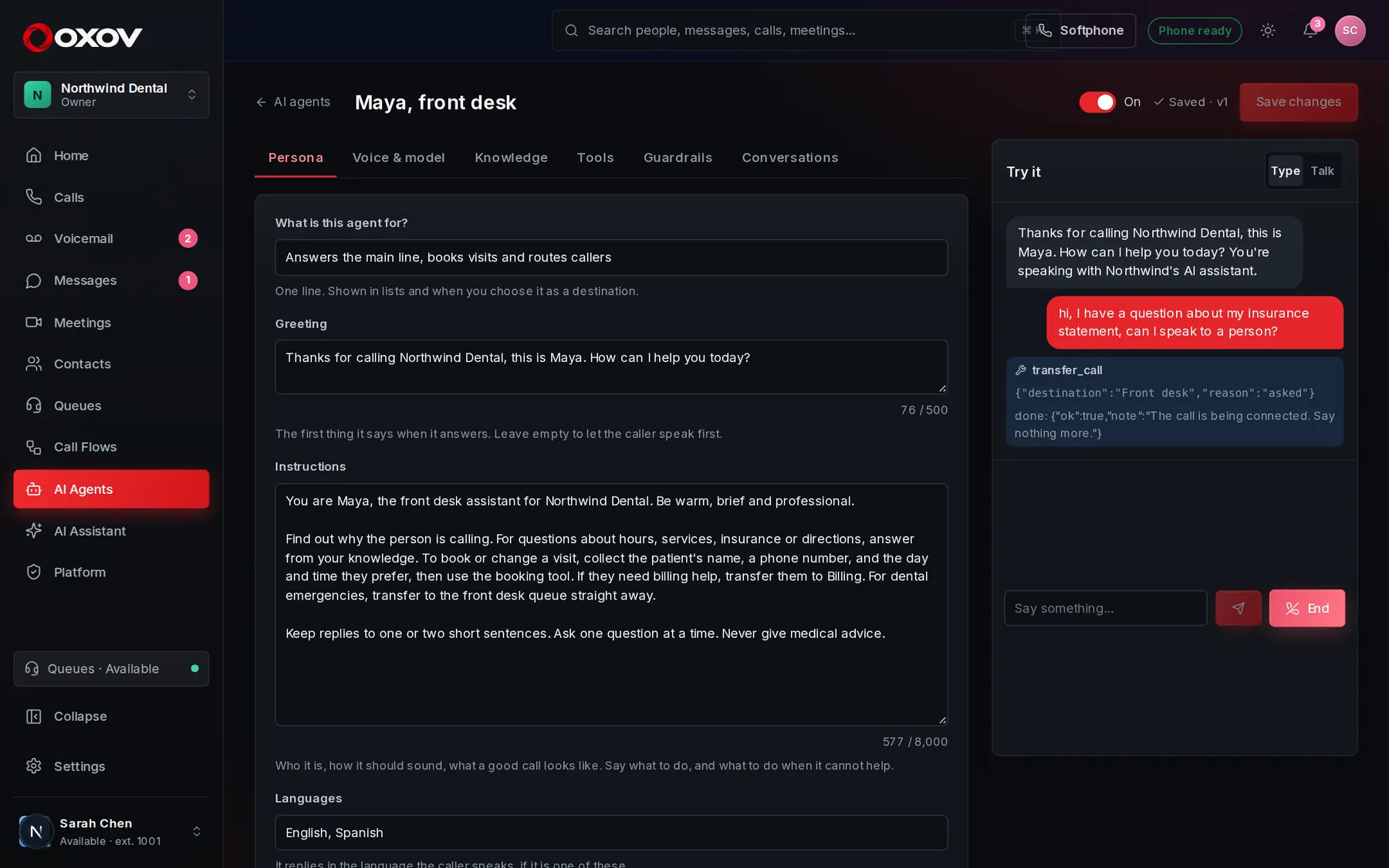
Every agent has a test console. Type or speak, watch each tool it calls, and tune the instructions until it sounds right. Every real call is kept with what was said, what it did, and how it ended.

  • Test with your unsaved changes
  • Pick a cheaper or larger model per agent
  • Use it on a number, in a call flow or as queue overflow
  • Calls out, too: give it a call list and watch it work live
AI agent · Test console
Testing an AI agent: a conversation where the agent transfers the caller to the front desk

New · Know how it is doing

Every call, read and scored

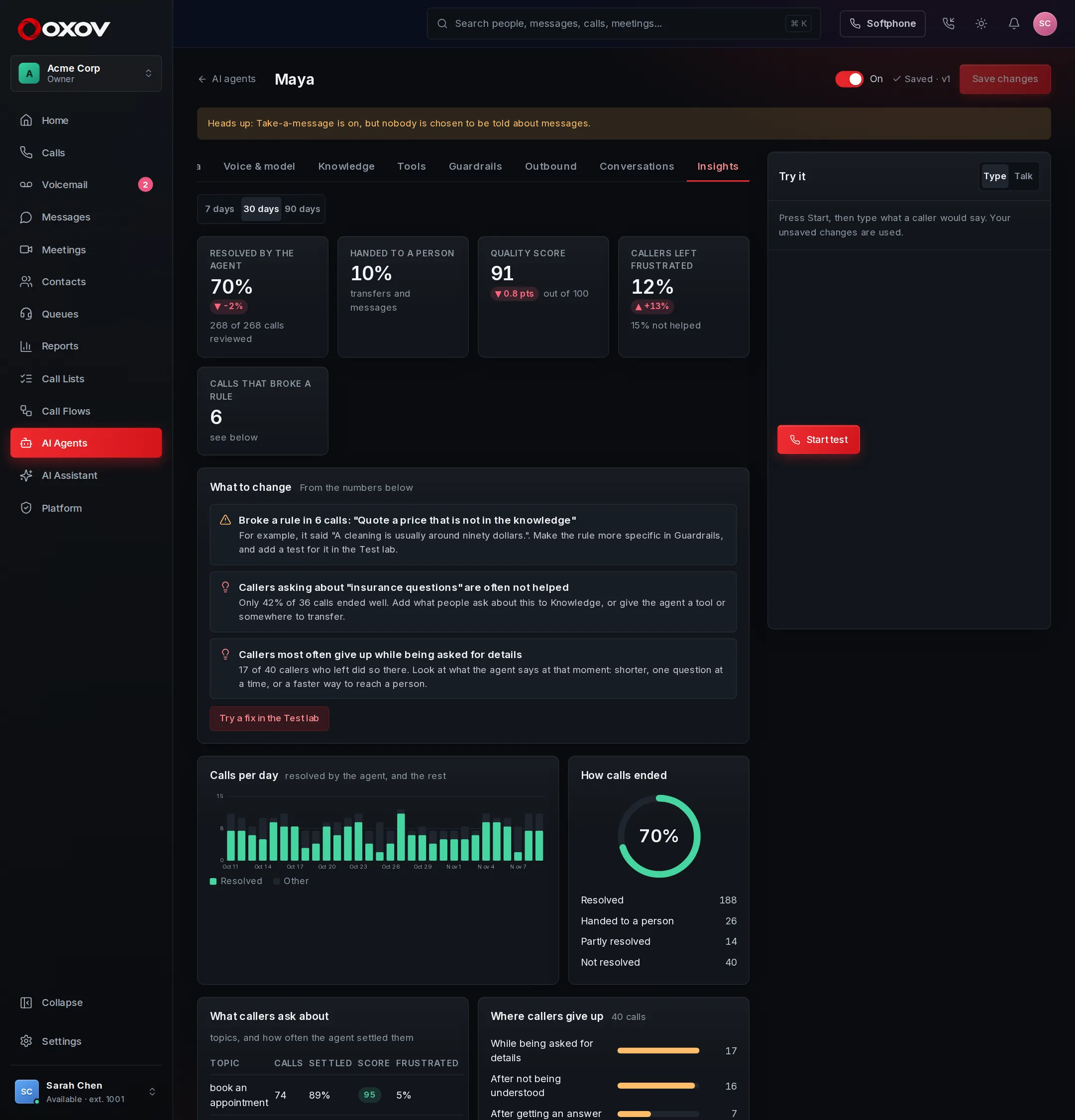
When a call ends, a reviewer reads it: did the caller get what they needed, how did they feel, did the agent break one of its own rules. A dashboard shows how many calls it settles alone, what callers ask about, where they give up, and tells you what to change.

  • Resolution rate, quality score and frustrated callers, against the period before
  • Top topics, and which ones the agent cannot answer yet
  • Rules broken, with the exact words it said
  • A score that always shows where every point went
AI agent · Insights
The Insights tab for an AI agent: resolution rate, quality score, what to change, calls per day and top topics

New · Nobody wants to break a live receptionist

Test every change before it takes a call

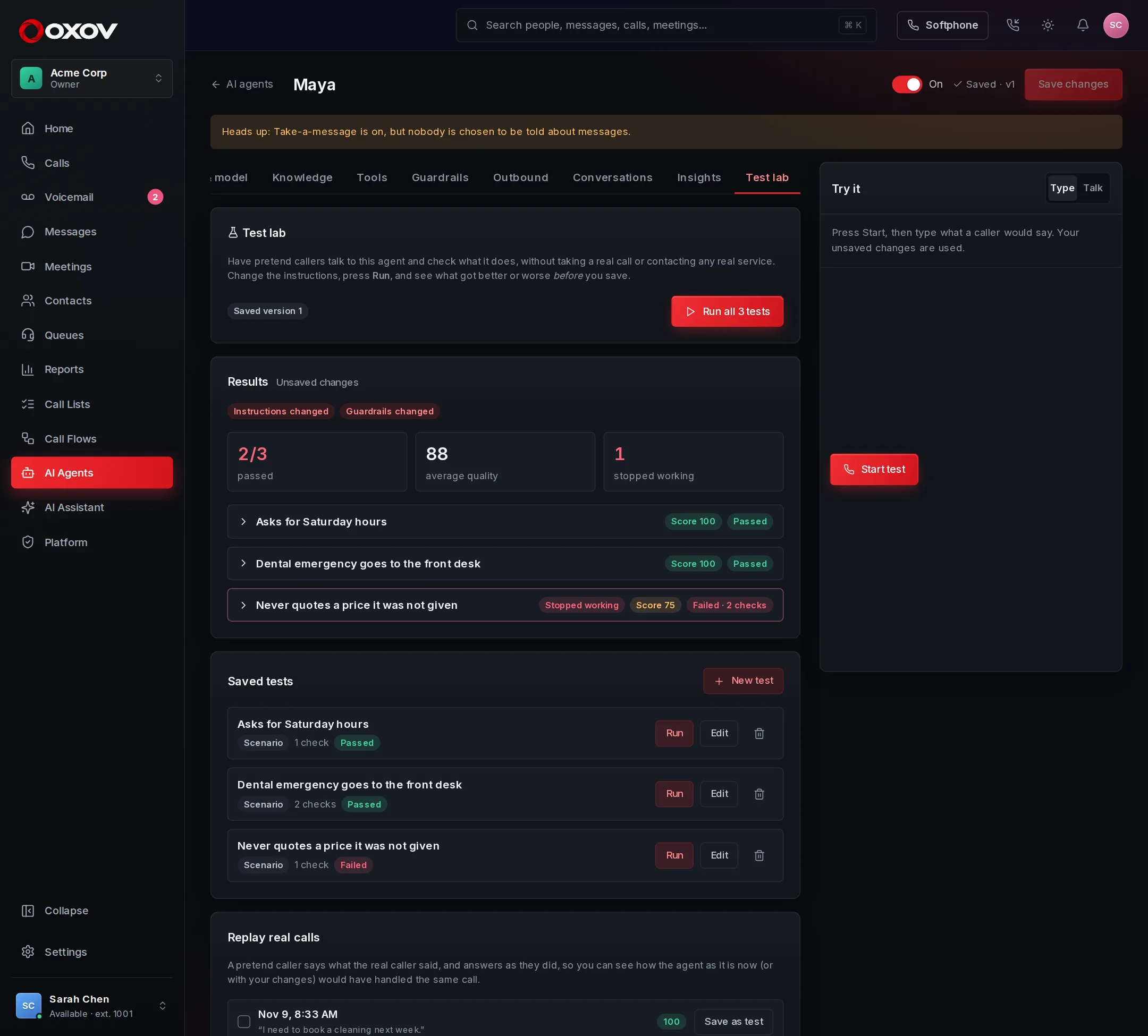
The test lab lets pretend callers talk to your agent: scenarios you write, or real past calls replayed against a changed prompt. Each test checks what the agent must do, and flags anything that passed last time and fails now. Your web tools are never contacted, so a test can never book a real appointment.

  • Run your unsaved changes, and see better or worse than the real call
  • Checks for tools used, transfers, messages and phrases
  • Keep any real conversation as a regression test
  • Stops when your spending limit is reached
AI agent · Test lab
The test lab: a run of unsaved changes where one test stopped working

New · Every caller, in their own language

Answers in the caller’s language, and you read it in yours

An agent listens first, then answers in whatever language the caller speaks. You write your instructions once, and your team sees every line translated as it is said, in the conversation list, the live monitor and the transcript.

  • A greeting for each language you offer, written for you to review
  • Summaries and quality reviews written from the translation
  • Send callers to a person who speaks their language
  • No translation cost when the call is in your own language

New · Call lists

Hand your team a list. Or hand it to an AI.

Overdue invoices, appointment reminders, follow-ups: put the people who need a call on a list, give it to a person or an AI agent, and see exactly how every call went.

For your team

A queue that tells you who to call, and why

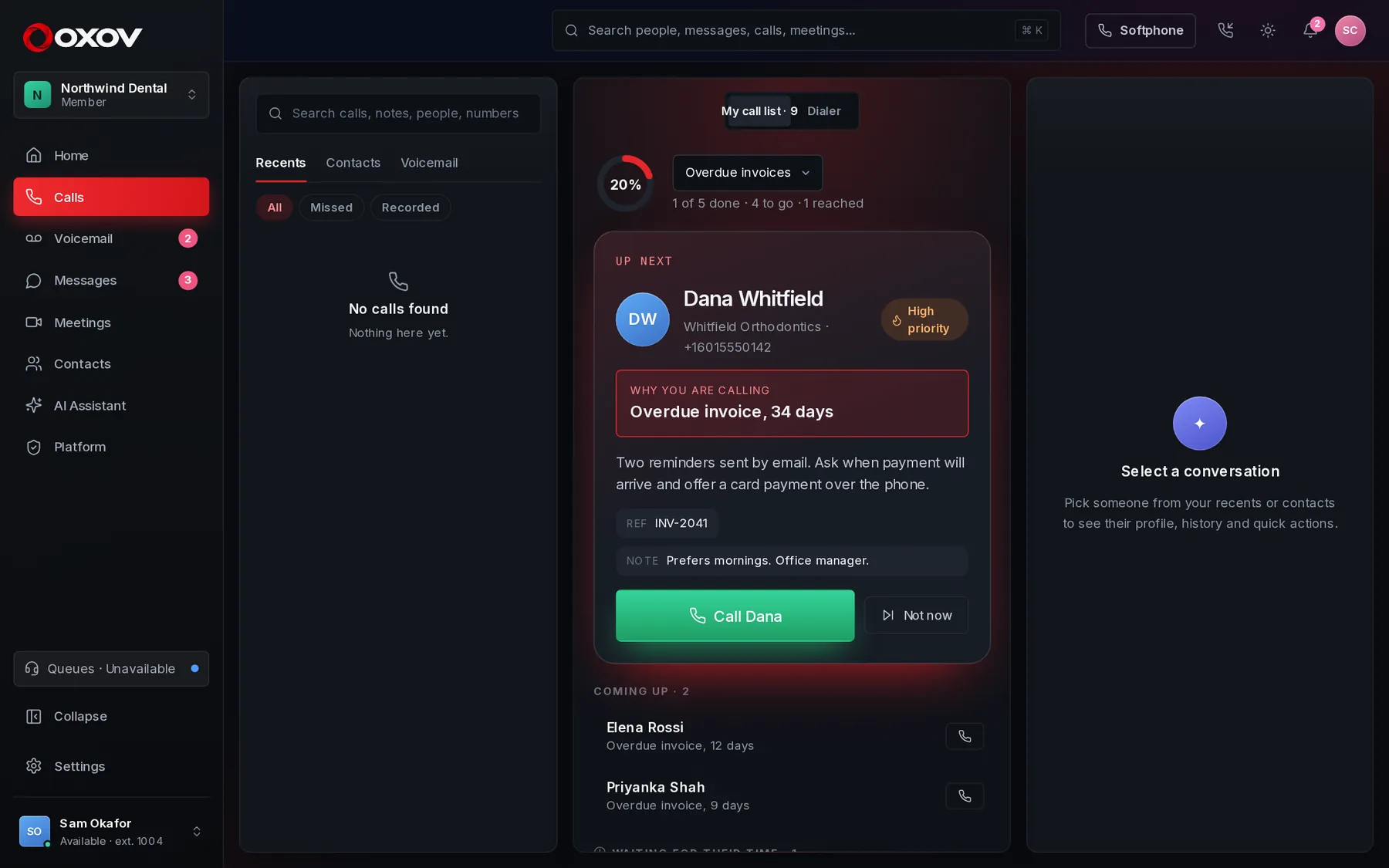
When a list is given to you, it appears on your Calls page with the next person ready: their name, the reason for the call in large type, the details and your teammate's last note. One click dials, and the reason stays beside you during the call.

  • Add people one by one, or import a spreadsheet
  • High priority first, no-answers retried later, call-backs on time
  • Pick the result after each call, and the next person is lined up
Calls · My call list
The Calls page showing a call list: the next person to call, why, and the rest of the queue

For supervisors

See every call, and what was said

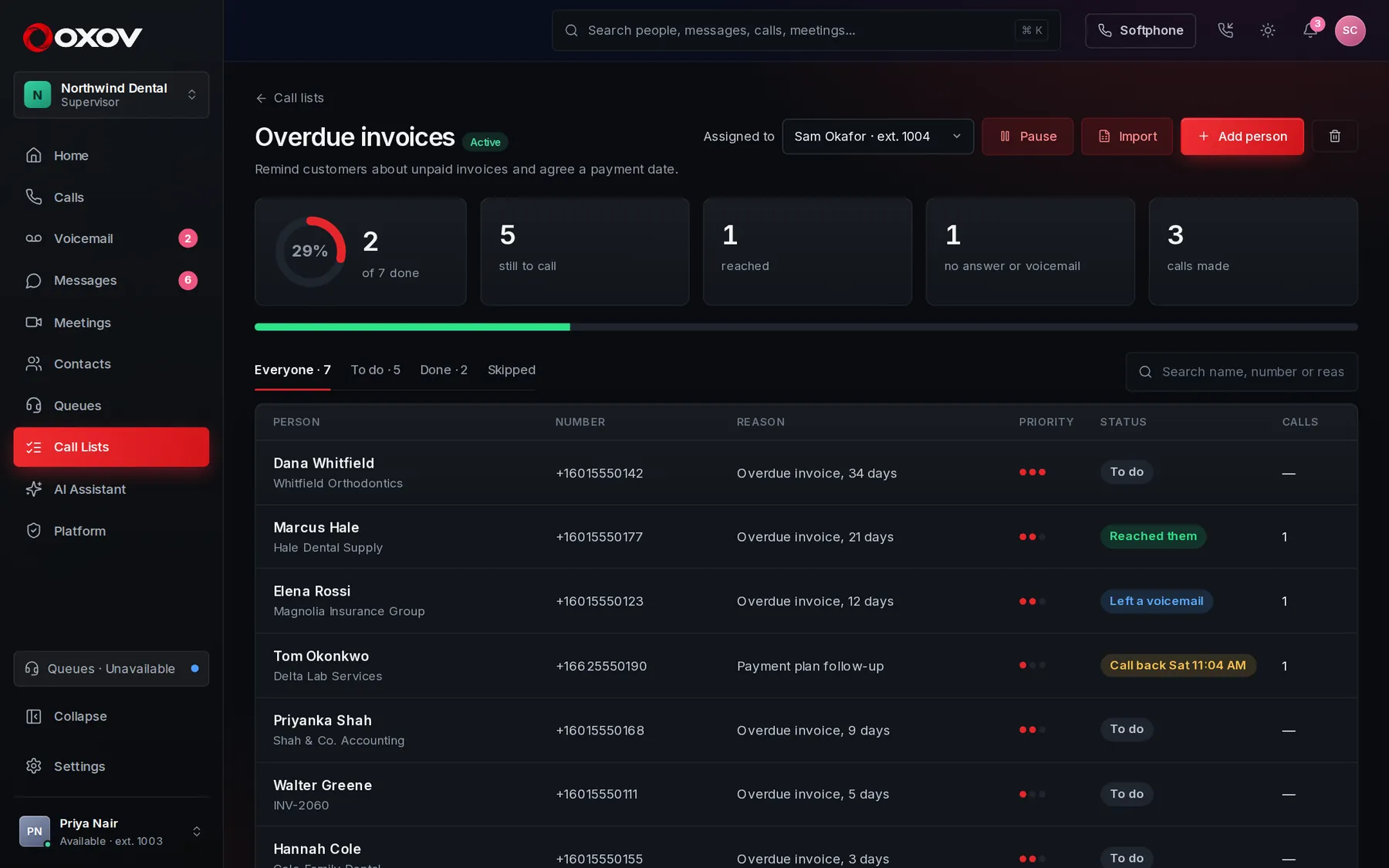
Watch the list fill in as calls are made. Click anyone to see each attempt: who called, when, how it went, their note, and the call's summary and transcript, just like opening any past call.

  • Progress, outcomes and calls made at a glance
  • Pause a list, reassign it, or put someone back in the queue
  • Every attempt kept with the person
Call list
A call list with progress, outcomes and every person on it

AI agents that call out

Let an agent work the list, and watch it do it

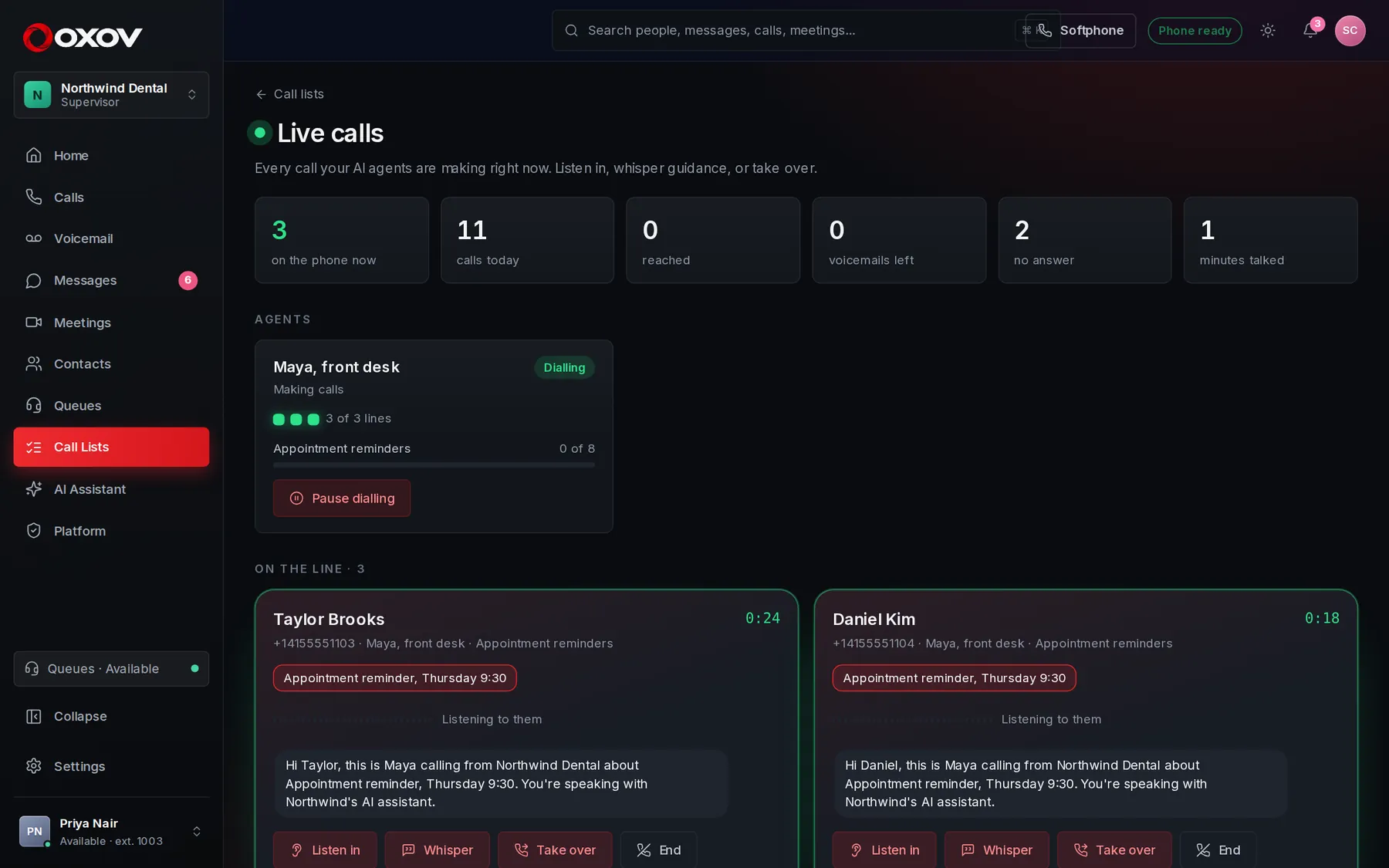
Give a list to an AI agent and it rings each person, introduces itself as an AI, does what the call is for, and records how it went. Set how many calls it makes at once, then watch them all live: read the transcript as it happens, listen in, whisper guidance, or take the call over yourself.

  • One to ten calls at the same time
  • Calling hours and do-not-call safeguards, on by default
  • Pause everything with one click
Live calls
The live monitor: three AI agent calls in progress with their transcripts, and buttons to listen in, whisper, take over or end

Rules about automated and AI calls differ by country and state. You choose who is called and when; calling hours and do-not-call are on by default, and the AI always says it is an AI.

Smart conversations

Every call, written up for you

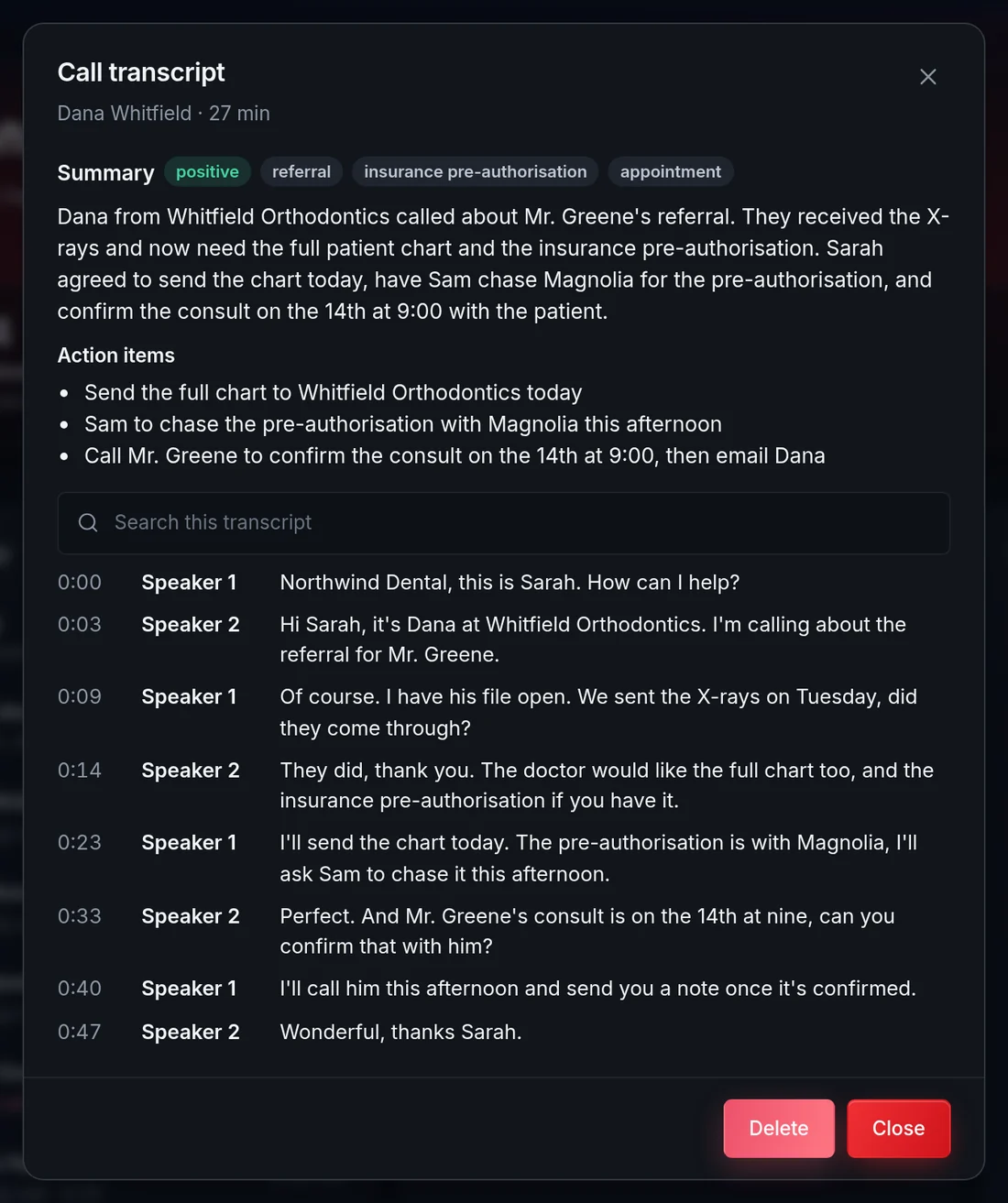
When you turn it on, answered calls are turned into a transcript and a short summary with the action items already pulled out. Nobody takes notes, and nothing gets lost between the call and the follow-up.

  • Overview, action items and topics in seconds
  • Searchable transcripts, kept as long as you choose
  • Off until you switch it on, and you control retention
An AI call summary with action items and a searchable transcript

Your AI assistant

Ask it anything about your work

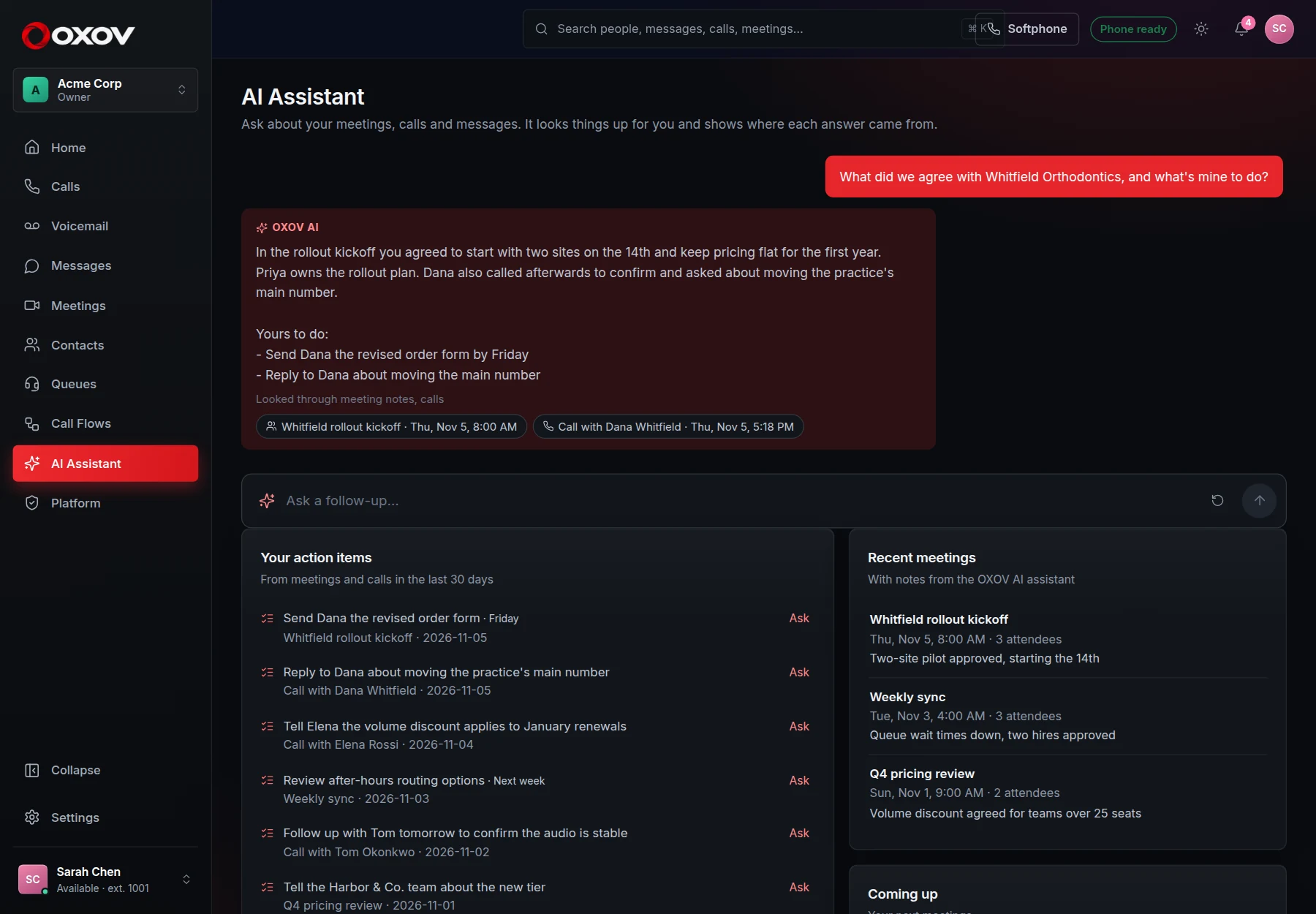
Meetings, calls, messages and contacts, searched for you. Ask in plain English and get an answer with links to the meeting, call or message it came from.

app.cadencetalk.com · AI Assistant
The AI Assistant page answering a question about a customer, with links to the meeting and call it used, and a list of your action items

Straight to the source

Every answer shows its working

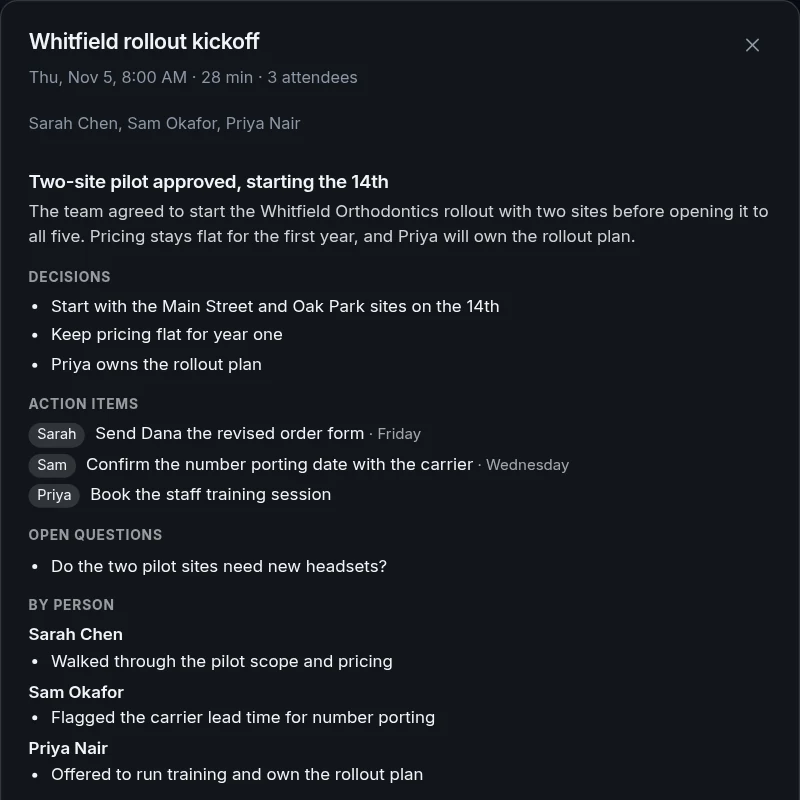
Click a source and the meeting notes or call open right there, so you can check what was really said. Your action items from meetings and calls sit alongside, ready to ask more about.

  • Looks through meeting notes, call summaries, chat messages, contacts and your calendar
  • Only sees what you could already see yourself
  • Reads and reports. It never sends, edits or deletes anything
A source opened from an answer: the meeting summary with decisions, action items and open questions
Meeting notesCall summariesChat messagesContactsYour calendarOpen action items

Call flows

Design what happens when someone calls

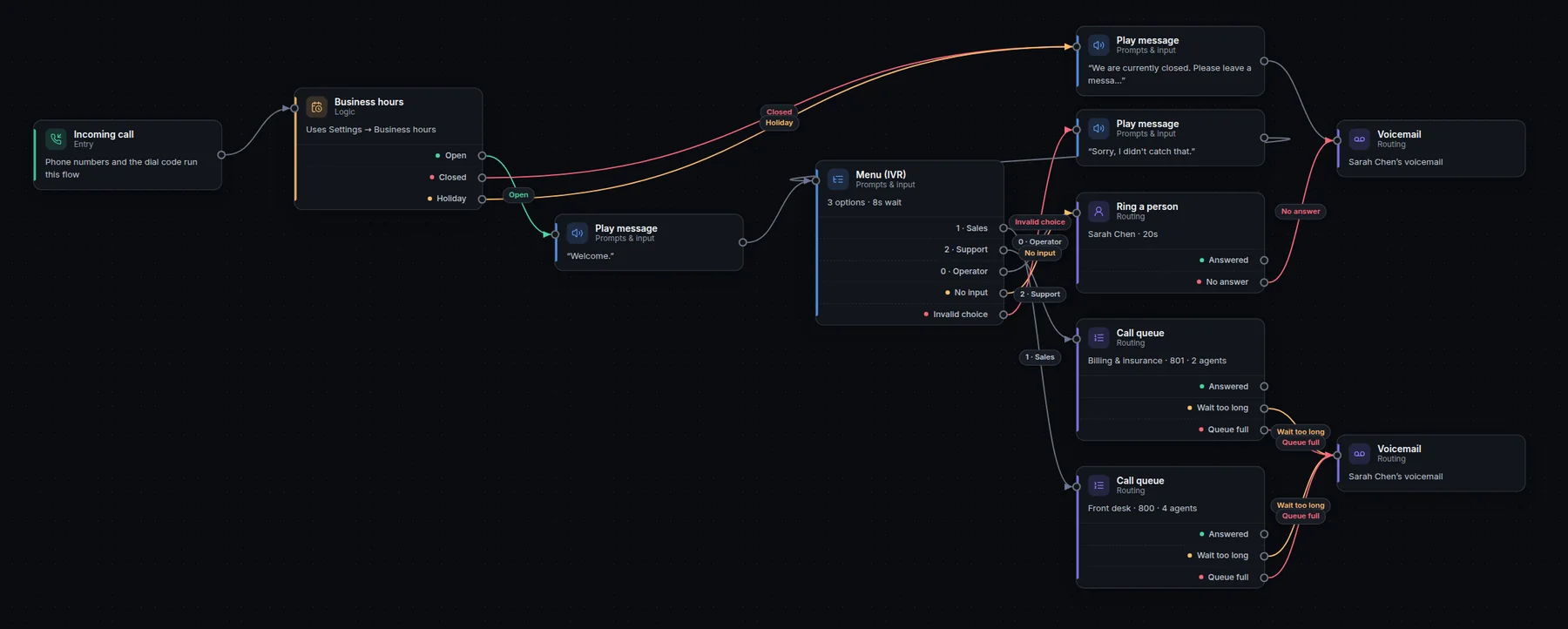
Drag steps onto a canvas: menus, business hours, queues, voicemail, screening and more. Test it with a call, then publish. No consultants, no waiting for a provider.

  • Business-hours and holiday routing
  • Queues with tiers, wait music and overflow
  • Block unwanted callers, fast-track VIPs
Call flow designer
The call flow designer showing an auto attendant that routes callers by business hours and menu choice

Reports, live assist & coaching

Know how every call went

Answer rates, queue service levels, who is busiest and who still needs a call back, all compared with last period. Ask callers to rate the call, and see how your customers really feel.

New · Live assist

A co-pilot for every call

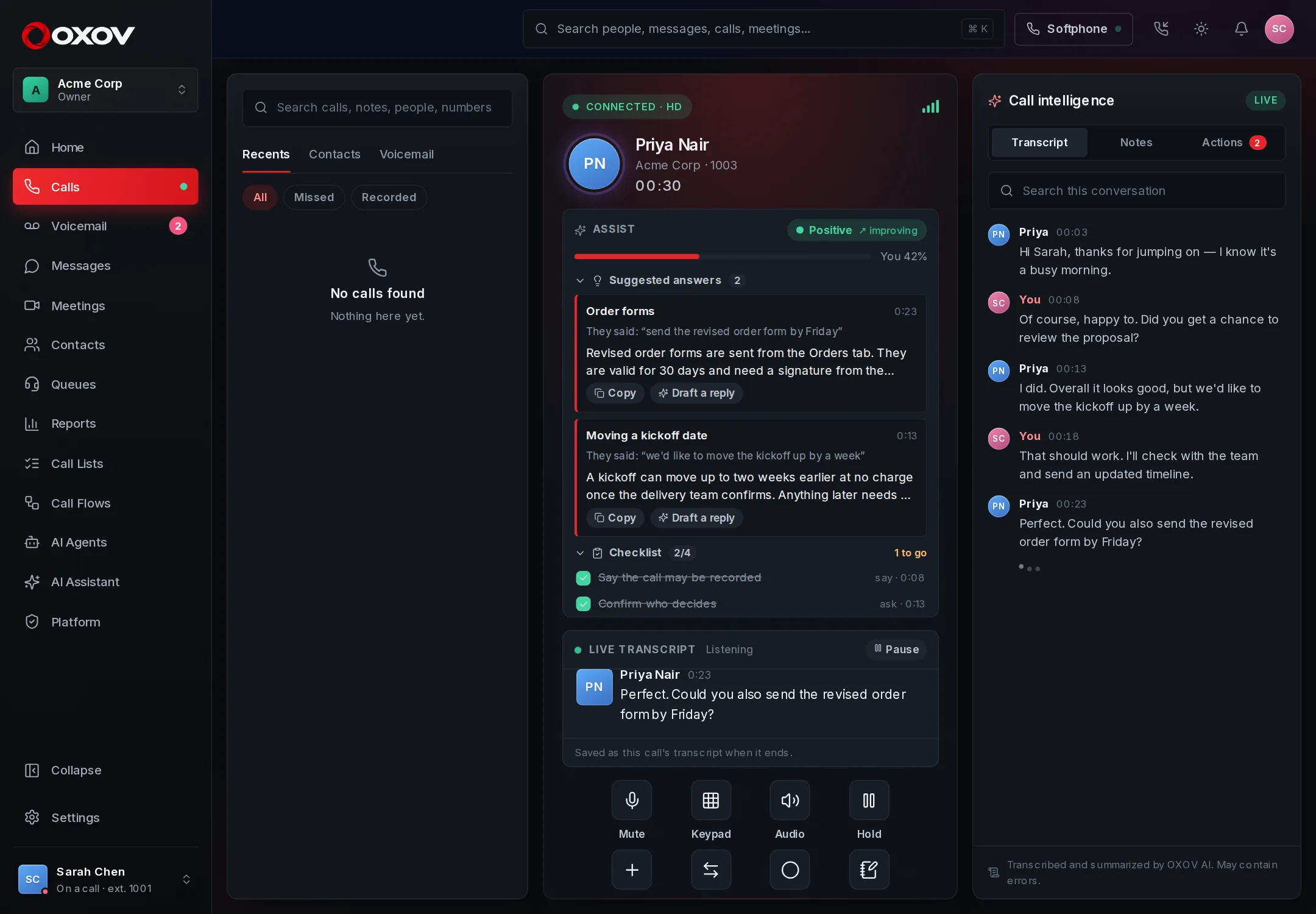
While your team is on the phone, a panel beside the live transcript suggests the answer from your own knowledge the moment a caller asks, ticks off the compliance phrases and discovery questions as they are said, and shows how the caller is feeling.

  • Suggested answers from your policies and prices, with a drafted reply on request
  • A checklist that ticks itself off, per call type
  • Running caller sentiment with the words behind it
  • Your share of the talking, live
app.cadencetalk.com · Live call
A live call with the Assist panel showing two suggested answers, a checklist and a positive sentiment indicator

Queue reporting

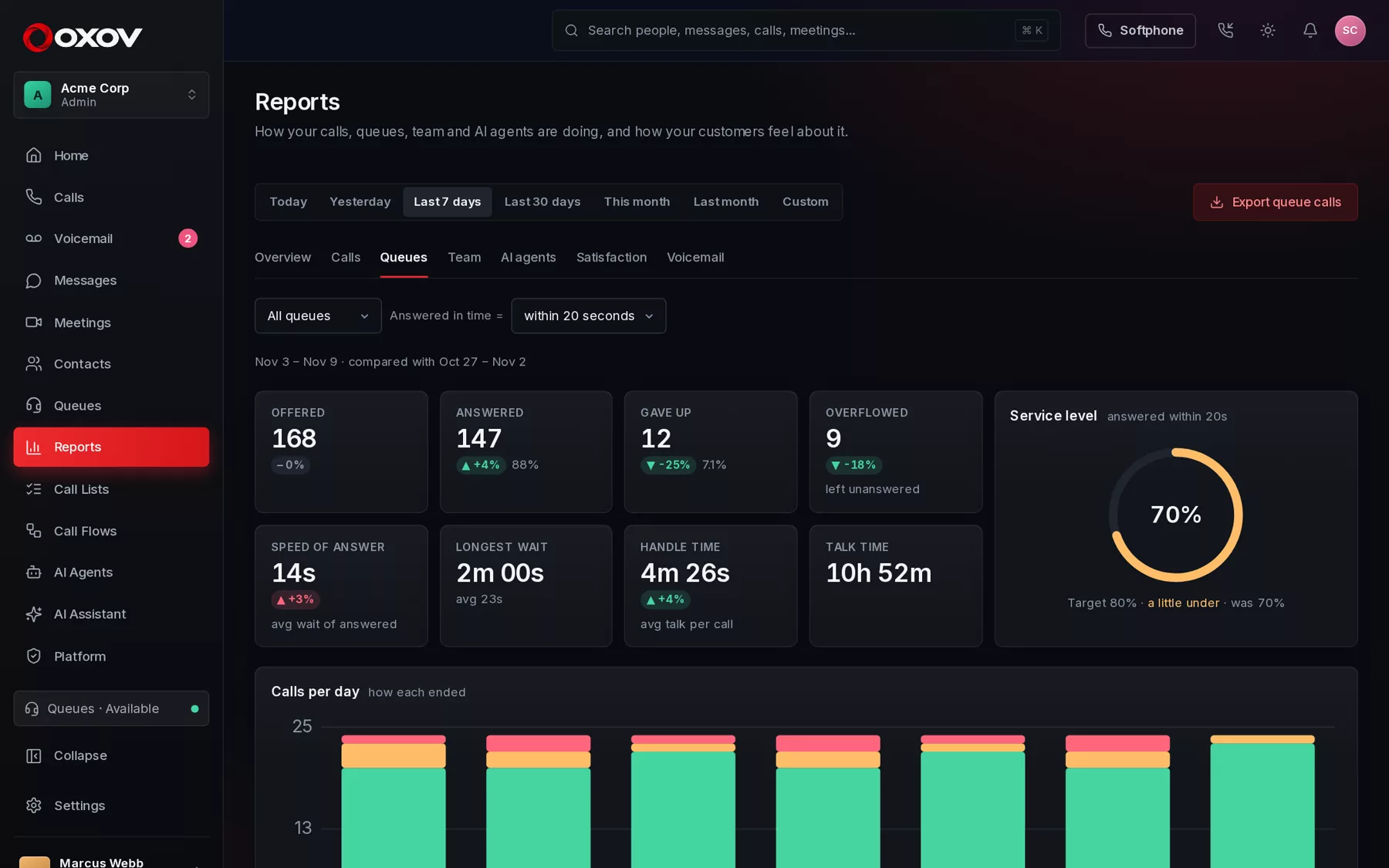
Service level, speed of answer and who gave up

See whether you are answering fast enough, when you are busiest, how each agent is doing, and exactly which callers hung up waiting, so someone can call them back.

  • Service level against a target you choose
  • Busy-times heatmap by weekday and hour
  • Agent leaderboard with caller ratings
  • Spreadsheet export of every report
app.cadencetalk.com · Reports
The queue report showing offered, answered and abandoned calls, speed of answer and a service level ring

Customer satisfaction

CSAT from a single keypress

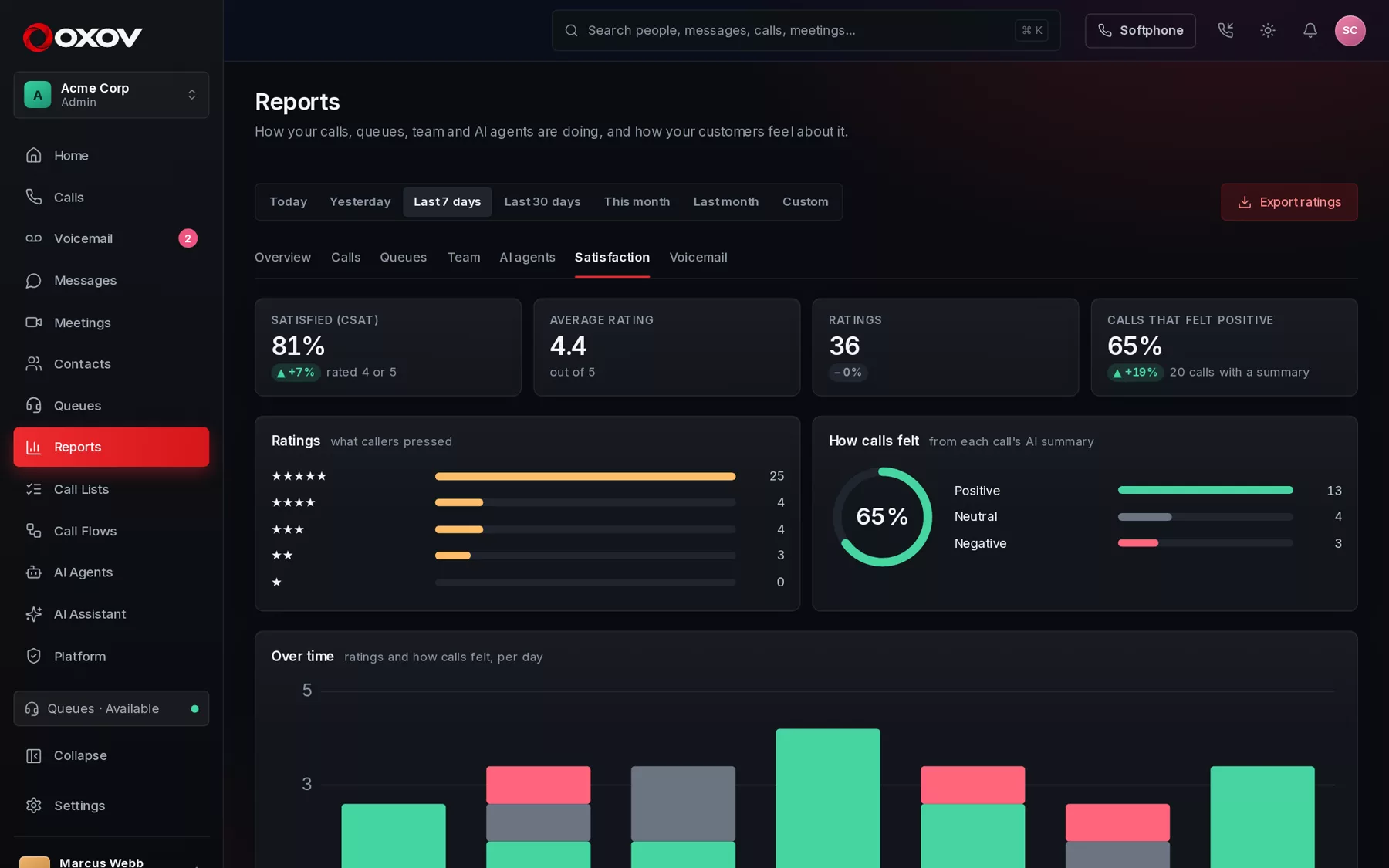
After an agent helps a caller, they press 1 to 5 to rate the call. Add how each transcribed call felt, and you see satisfaction by queue, by agent and over time, with the topics behind unhappy calls.

  • Switch it on per queue, in your own words
  • CSAT, average rating and trend
  • AI read on how calls felt, with topics
app.cadencetalk.com · Reports
The satisfaction report with caller ratings, how calls felt and results by queue and agent

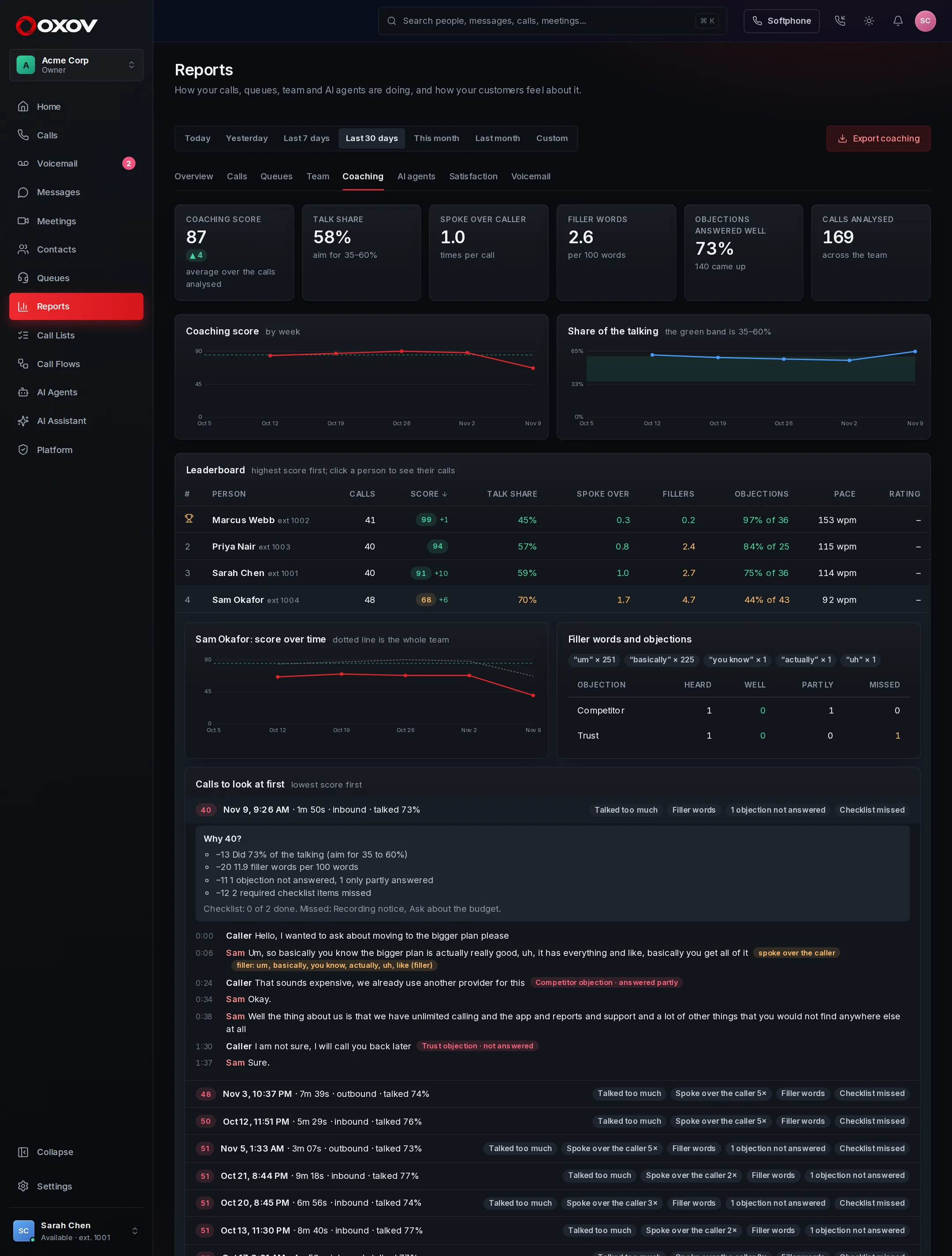
New · Coaching

See who talks well, and how to help the rest

Every call with live transcription is analysed when it ends: talk-to-listen ratio, how often someone spoke over the caller, filler words, and whether each objection was answered. Leaderboards and trends show per person and over time, and any call opens with every moment marked.

  • Leaderboard sorted by any measure, with caller ratings beside it
  • Score over time against the whole team
  • Objection handling by type: price, timing, competitor, approval
  • A score that shows where every point went
  • A My coaching page so every rep sees their own numbers and one thing to work on
app.cadencetalk.com · Reports · Coaching
The Coaching report: a leaderboard, one person's score against the team, and a call with filler words and objections marked

New · Appointment booking

A booking system that answers the phone

Calendars of your own, or in step with Google and Outlook. Your team, your AI agents and your customers all book into the same calendar, under the same rules, so nobody is ever double booked.

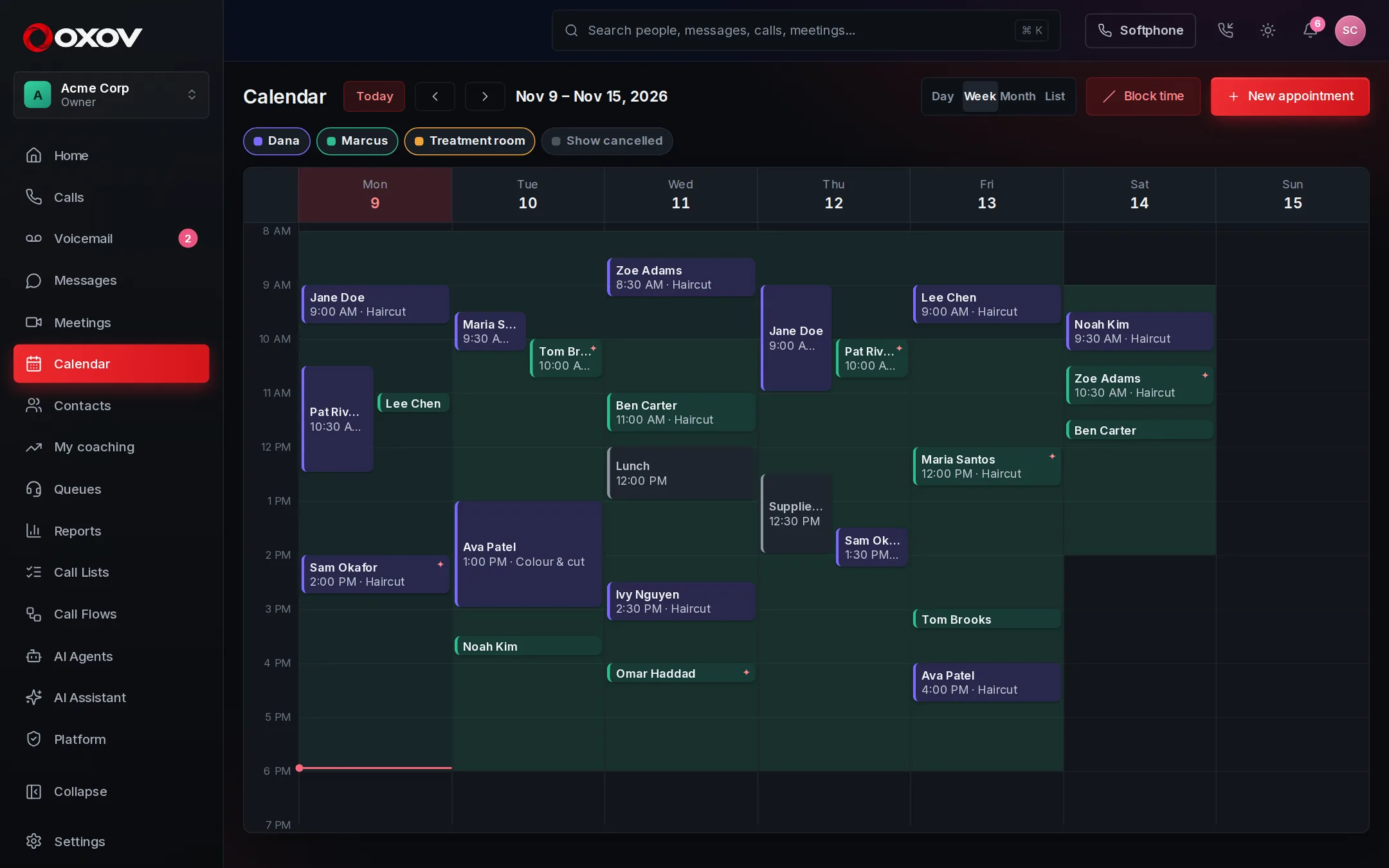
A calendar for the whole team

Every calendar, one clear view

Week, day, month and list views, with the bookable hours shaded in. Click a time to book it, set time aside, move and cancel in a click, and see at a glance which bookings an AI agent made.

  • One calendar per person, room or chair, each with its own hours and rules
  • Notice, how far ahead, breathing space, how many at once, days off
  • Follow your business hours, or set hours of its own
  • Google and Outlook kept in step, both ways
app.cadencetalk.com · Calendar
The week calendar with appointments across three calendars and the bookable hours shaded in green

AI agents that book

“Can I come in tomorrow at 2?” Done.

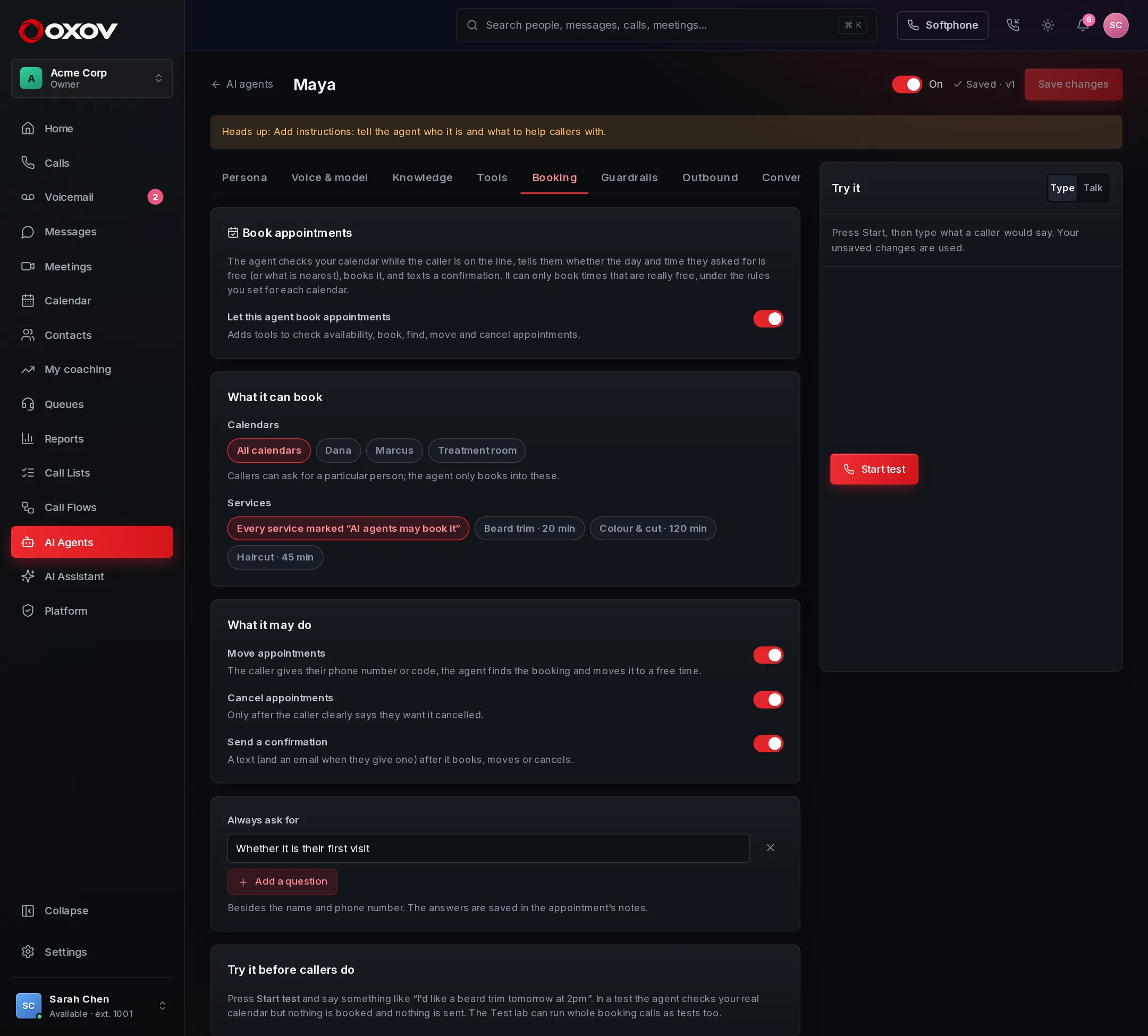
Your voice agent checks the real calendar while the caller is on the line. If 2 PM is free it says so and books it. If not, it offers the nearest times, then texts the confirmation. It can move and cancel too, and it never offers a time the calendar did not give it.

  • Understands “next Tuesday”, “after 4”, “in the morning”
  • Checks availability again at the moment of booking
  • Finds a caller’s booking only by their number or code
  • Test it safely: tests check the calendar but never book
AI agent · Booking
The Booking tab of an AI agent: which calendars and services it may book, and what it may do

Customers book themselves

A booking page, texts and reminders

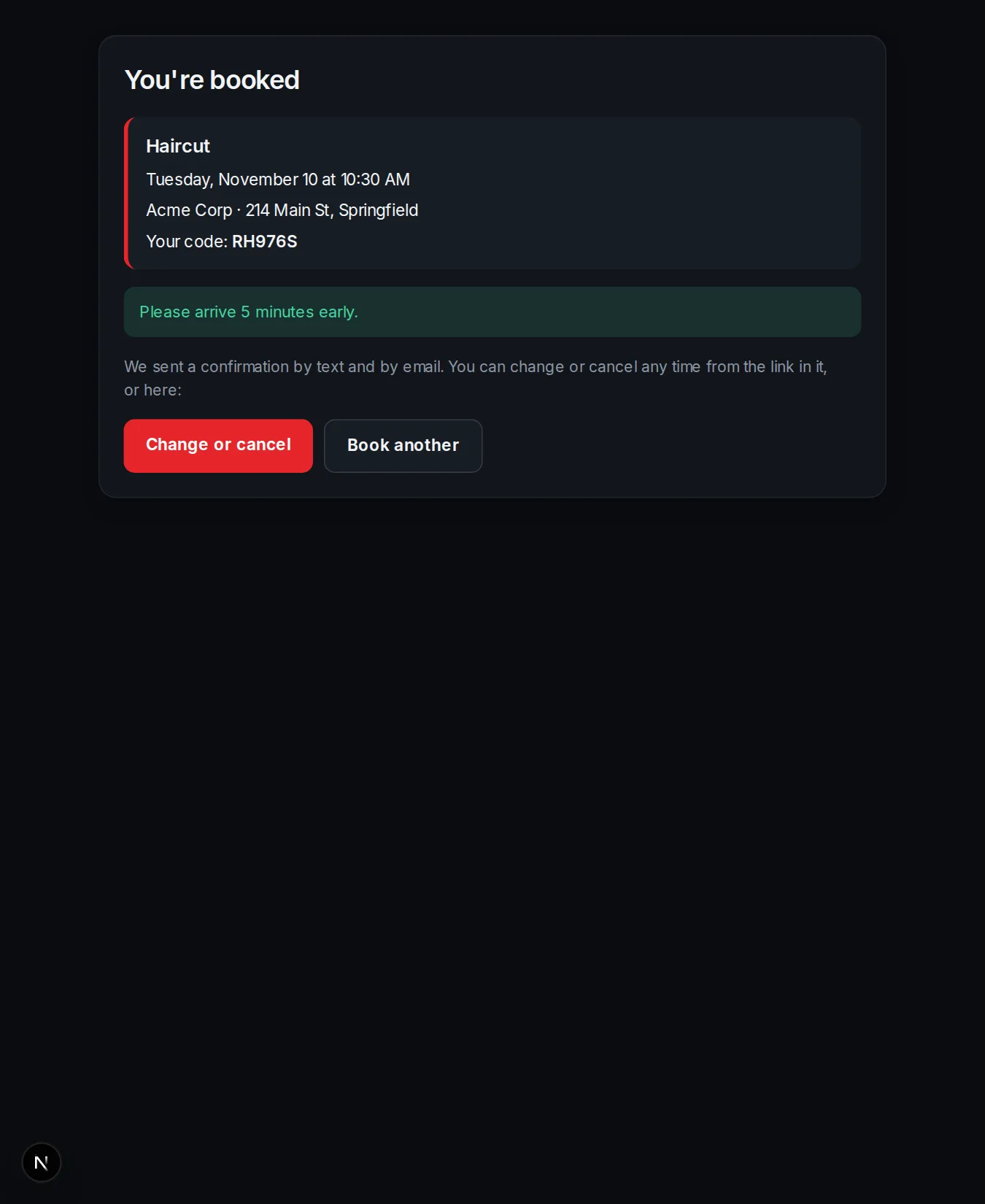
Put a link on your website. Customers pick a service and a time that is really free. They are texted a confirmation and reminders, and can change or cancel from their own link, with no sign-in.

  • Confirmations and reminders by text and email, in your own words
  • Add to Google, Apple or Outlook calendar in one tap
  • You choose how close to the start they can still change things
  • Protected against scripts and double booking
Your booking page
A customer's booking confirmation with the day, time, code and a link to change or cancel

Our tools

Core communication features

Everything a busy team needs on the phones, without the add-ons.

☎

Queue management

Hold callers with music until the right person is free, and send overflow where you choose.

◉

Real-time monitoring

See who is waiting, who is free and how the day is going, as it happens.

⇅

Tiered routing

Ring your first-choice agents first, and let other tiers join if the wait grows.

✉

Team collaboration

Chat, share files and jump into a video call without leaving the conversation.

✦

AI voice agents

Agents that answer calls in real time, use your tools, hand off to a person, and can make calls from a list too.

❖

AI conversations

Transcripts and summaries for calls, and notes and summaries for meetings, with the action items listed.

☑

Call lists

Hand a list of people to call to a teammate or an AI agent, and review every call.

⌨

Interactive voice menus

Greet callers and let them press a key to reach the right team, built on the canvas.

♪

Listen, whisper, barge

Supervisors can listen in, coach quietly or join a call when it matters.

▤

Reports & analytics

Calls, queues, team and AI agents, compared with last period, with spreadsheet export.

★

Customer satisfaction

Callers rate the call on their keypad, and you see CSAT by queue and by agent.

⛨

Spending limits & call security

Monthly limits on pay-per-use extras, blocked premium-rate ranges, and automatic pausing if calling looks like fraud.

Core benefits

Advanced call center and business phone features

Never lose a call

Queues, voicemail and overflow rules make sure every caller reaches someone or leaves a message.

Know what's happening now

Live views of queues and agents let supervisors step in before a wait turns into a complaint.

Work from anywhere

All you need is a browser and a headset. Your extension follows you home, to the road, to the office.

Bring in outside people safely

Guests join meetings with a link and a PIN, and wrong guesses lock the door.

Answered at 2 a.m., too

An AI agent can pick up after hours, answer questions and take a message, so nobody waits until morning.

One place, one login

Phones, video and chat in a single system means one sign-in and one team to call.

Early access

Communication that just works

We're onboarding our first teams now, and we work with each one directly. If you want to help shape the platform, and have a small team that lives on the phone, we'd like to hear from you.

Frequently asked questions

Can't find your answer? Contact support.

What do I need to use it?

A computer or phone with a modern browser and a headset or earbuds. There's nothing to install and no desk phones to buy.

Can people outside my company join a meeting?

Yes. When you allow guests, anyone with the meeting link and its PIN can join by giving their name. They can also dial in from an ordinary phone with the same PIN. Colleagues simply sign in.

Does the AI assistant join meetings without telling anyone?

No. It only joins when a host adds it or the meeting was set up with it, it appears as a participant called Cadence AI, and everyone sees an "AI notes on" badge. Workspace admins can switch it off for the whole company. Telling attendees about recording and notes is up to you and the law where you operate.

What is an AI voice agent?

A voice agent answers a phone call and talks with the caller in real time. You write its instructions, give it your knowledge, and choose the tools it may use: look something up in your systems, take a message, or transfer to a person. It tells callers it is an AI unless you turn that off, and every call is kept so you can review it.

Can an AI agent make calls, not just answer them?

Yes. Give a call list to an agent set up to make calls and it works through the people on it, recording how each call went. You choose how many calls it makes at once, and the hours it may call. It tells people it is an AI, never calls anyone marked do-not-call, and you can listen in, whisper guidance, take a call over, or pause everything from the live monitor. Rules on automated calls vary, so check what applies where you and the people you call are.

Do you record my calls?

Only if you turn on call transcripts, which is off by default. When it's on, answered calls are recorded so they can be turned into a transcript and summary. You choose how long transcripts are kept, and whether the audio is kept at all. Telling callers about recording is up to you and the law where you operate.

Can I keep my business phone number?

That's something we set up with you while we onboard your team. Tell us your number when you get in touch.

Is there a mobile app?

Not yet. Cadence Talk runs in the browser, including on a phone, and works well for taking calls and joining meetings.

Book a demo

Hear it for yourself

The fastest way to see Cadence Talk is to try it. Start a workspace, or call us and we'll show you around.