
Getting started
Cadence Talk puts your phone, voicemail, messages, video meetings and AI helpers in one browser tab. There is nothing to install and no desk phone to plug in.
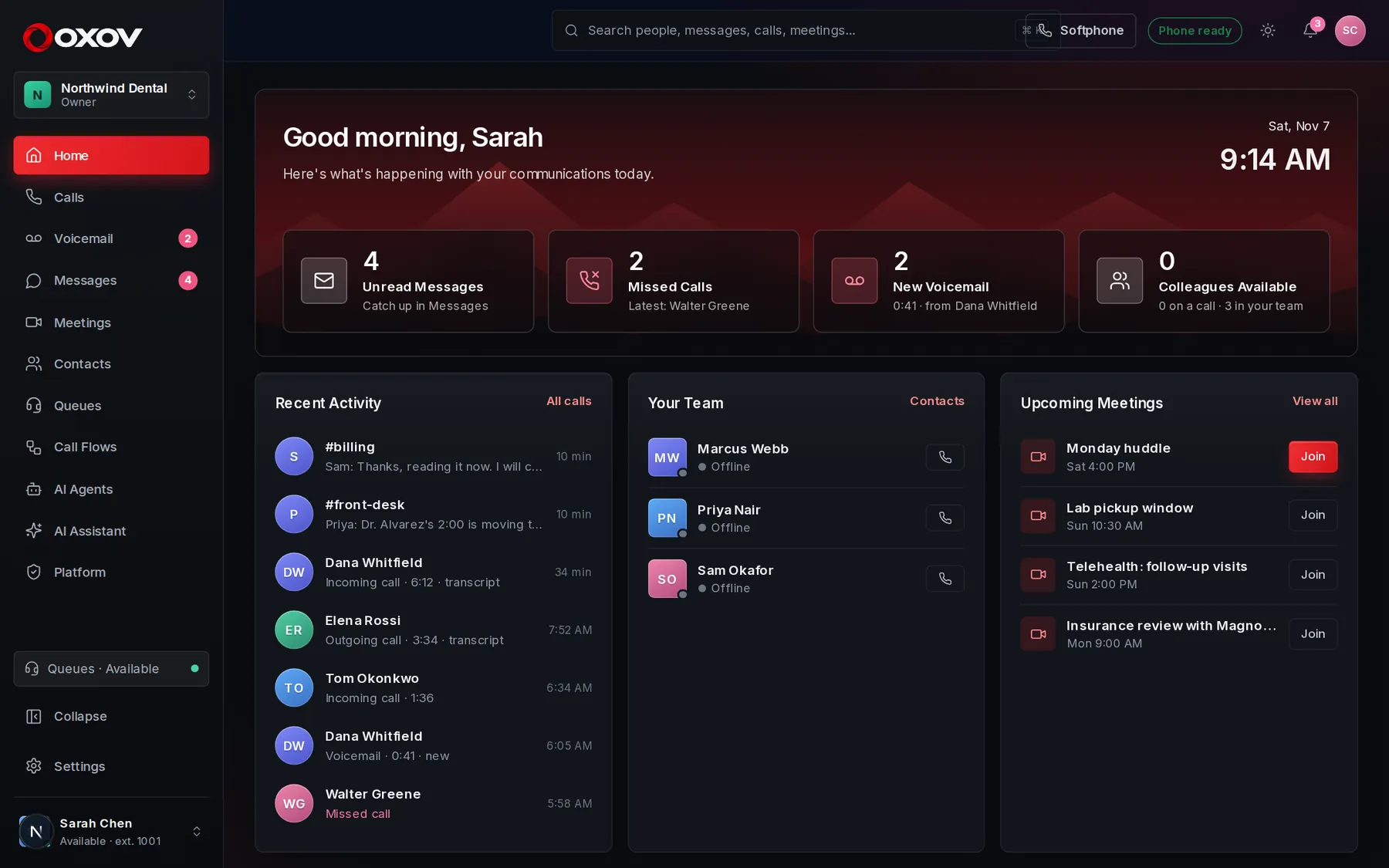 1234
- The sidebar: every part of Cadence Talk is one click away.
- Search people, messages, calls and meetings. Press Ctrl K from anywhere.
- Notifications bell, theme switch and your profile.
- Your name, extension and availability. Click to change your status.
1Your first two minutes
- Sign inGo to app.cadencetalk.com and sign in with the email your admin invited. Your extension and softphone are already set up for you.
- Allow the microphoneYour browser asks once. Choose Allow so you can hear and be heard. A headset makes calls sound much better.
- Open Calls and dialClick Calls, type a name or number, and press the green Call button. Calls to other people at your company ring their browser at once.
- Check your statusThe bottom-left shows Available. Click it to switch to Away or Do not disturb when you need quiet.
2A tour of the sidebar
Everything lives in the left sidebar. What you see depends on your role: members see the everyday tools, supervisors also see queues, and administrators also see call flows, AI agents and settings.
Home
Your day at a glance: calls, voicemail, meetings and what needs you.
Read more →Calls
The softphone: dial, answer, transfer, merge and review history.
Read more →Voicemail
Listen, read the transcript and call back.
Read more →Messages
Channels, direct messages and threads.
Read more →Meetings
Video meetings with guests, dial-in and an AI note-taker.
Read more →Contacts
Your team and your outside contacts in one place.
Read more →Queues
Share incoming calls across a team.
Read more →Reports
Calls, queues, team, AI agents and customer satisfaction.
Read more →Call Lists
Lists of people to call, handed to your team.
Read more →Call Flows
Design what happens when someone calls.
Read more →Appointments
Calendars, booking, texts and reminders, and agents that book by phone.
Read more →AI Agents
Voice agents that answer calls like a person.
Read more →AI Assistant
Ask questions about your meetings, calls and chats.
Read more →3Roles: who can do what
Every person in a workspace has one role. Your admin can change it under Admin → People → Team.
| Role | What they can do |
|---|---|
| Member | Call, message, meet, use voicemail and contacts, and use the AI assistant on what they can already see. |
| Supervisor | Everything a member can, plus view call queues, live wallboards, reports and call transcripts of their team, and manage call lists and watch AI agents’ live calls. |
| Admin | Everything above, plus call flows, AI agents, numbers, business hours, audio, voices, AI settings and users. |
| Owner | Everything an admin can, plus the workspace itself. |