
Docs / Talk & collaborate · Everyone
Voicemail
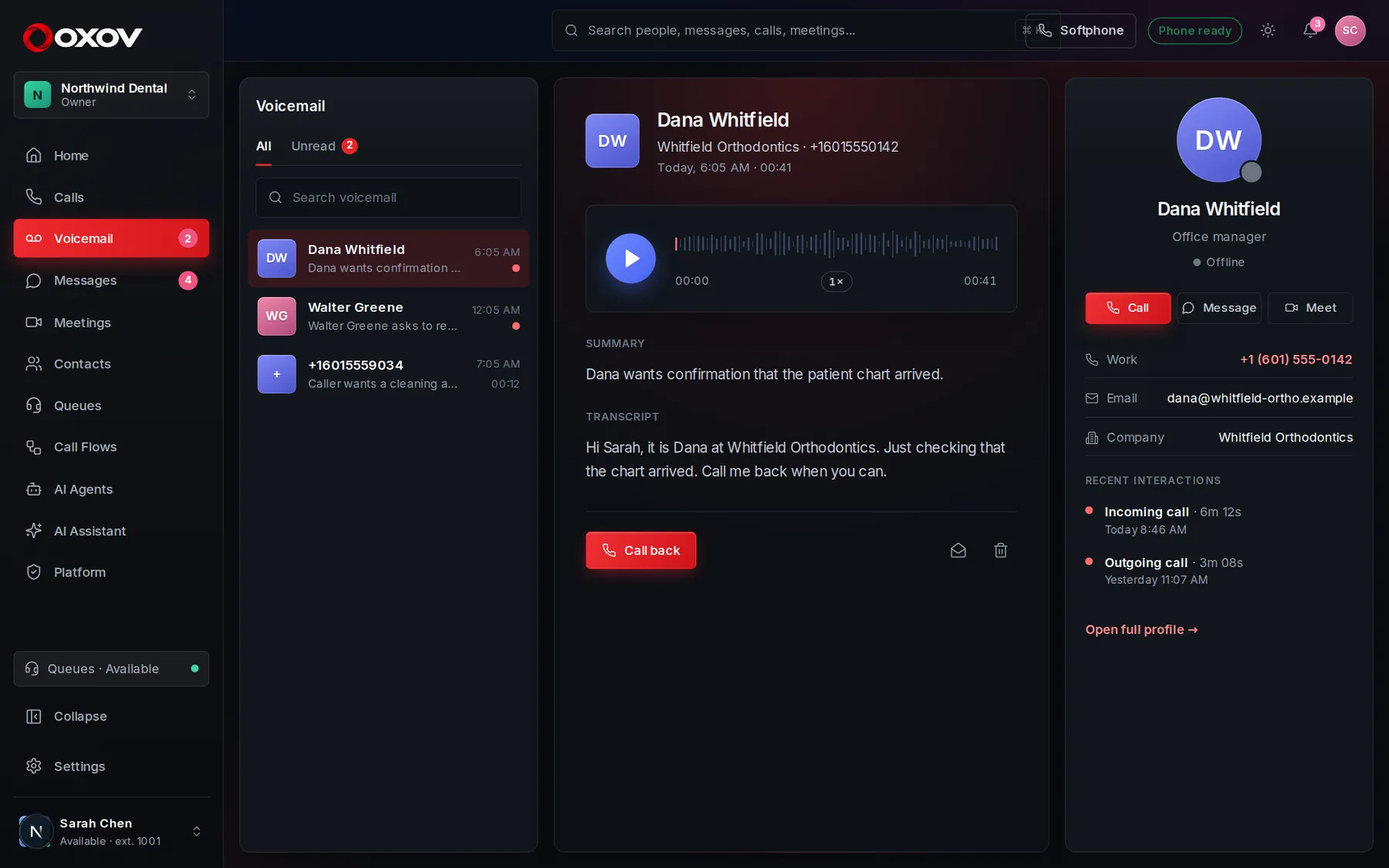
When someone can’t reach you, they can leave a message. It lands here, and in your notifications, with a transcript and a one-line summary when AI is on.
1How a voicemail arrives
A caller reaches your voicemail when you are on another call, away, in Do not disturb, or do not answer in time. You get a notification straight away. If your workspace has AI summaries on, the message is also written out and boiled down to one line, so you can decide at a glance whether to listen.
2Working your inbox
- Play a message right in the page, and scrub to any point.
- Read the transcript instead of listening, when it is available.
- Press Call back to ring the person at once.
- Unread messages show a count on the sidebar. Mark one unread to come back to it.
- Delete a message you no longer need.
Voicemail to email: by default a copy of each message is emailed to you. Turn this off under Settings → Profile & preferences.
3Greetings
Admins set the greetings callers hear in the Audio library, and each person can choose what callers hear when they miss them under Settings → Call routing.